Google has set a new minimum size for product images. From 31 January 2027, an image in the image link [image_link] attribute has to be at least 500 x 500 pixels, and a product whose image is smaller than that will not be approved.
Google’s documentation for the [image_link] attribute now carries the change at the top of the page, and it is worth reading the exact wording rather than the headline version.
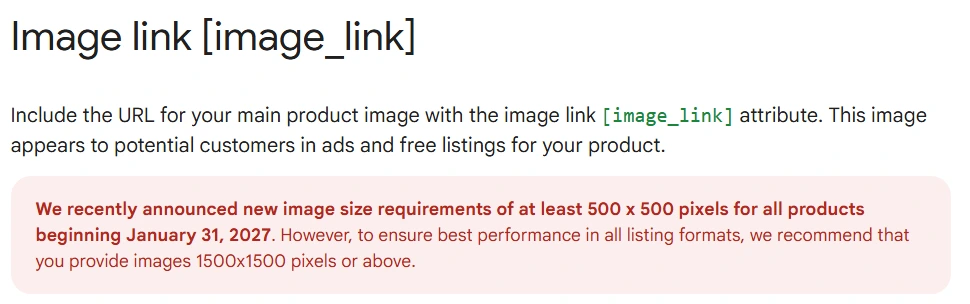
Two numbers, not one, and treating them as one is how people end up doing this job twice. 500 x 500 is where disapproval stops. 1500 x 1500 is where the listing formats stop cropping your product into a smudge. The gap between them is nine times the pixel area.
The deadline is seventeen months out, which sounds like a problem for next year. It is not, because the products that will fail are already identifiable today. Google’s own line on what happens to an image that misses the requirements is on the same page: “your product will be disapproved and you will be notified in the Diagnostics section of your Merchant Center account”. The list exists now. Nobody has to wait for January 2027 to find out how long it is.
What Google’s documentation actually says
Further down the same page, under Image guidelines, the minimum requirements spell out the rest of the spec. The size floor sits alongside two ceilings people forget about.
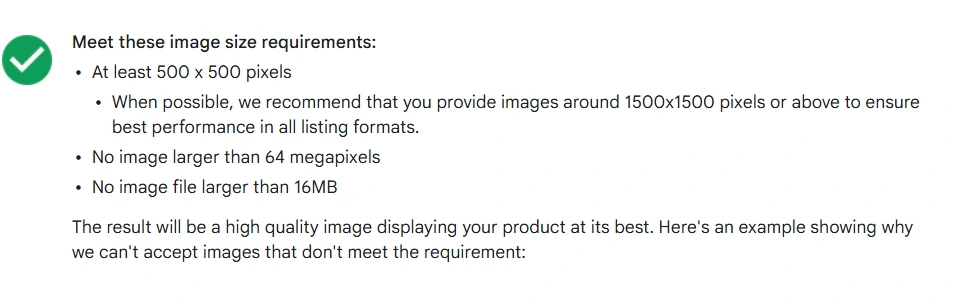
Put next to the best practices further down the same page, that is the whole spec in the order it disapproves you:
The framing rule is the sneaky one. A 600 x 600 image that clears the size floor but has the product sitting at 30 per cent of the frame passes the check and still looks like a stock photo of a table.
The part of this that is a crawl problem, not an image problem
Here is why I am writing about a Merchant Center notice on a site about indexing.
Every product image in a feed is a URL that Google has to fetch. Google’s own requirements for [image_link] say it in plain terms: “Make sure your URL can be crawled by Google. For example, ensure your robots.txt file is configured correctly to allow Googlebot and Googlebot-image access to your product images.”
When somebody asks me why their feed is full of image errors, the resolution is a robots.txt line about half the time, not the image. A blanket Disallow: /wp-content/uploads/ or a CDN path blocked years ago for crawl budget reasons. The image is 2000 x 2000 and perfect; Google has never been allowed to look at it.
So when you go and resize a batch of images for this deadline, do the crawl check in the same pass, because you are about to change every one of those URLs anyway:
- Take three real
[image_link]URLs out of your feed. - Test them against your robots.txt for
Googlebotand forGooglebot-image, which are separate user agents and can be treated differently. - Fetch each one logged out, in a private window. A hotlink protection rule that serves your own browser fine and gives everyone else a 403 is common on Shopify and WordPress alike.
- After you re-upload the feed, allow 24 to 48 hours before deciding anything changed. Google says that outright on the same page.
I wrote up the wider version of that failure in failed: robots.txt unreachable, and the difference between blocking and removing in noindex vs robots.txt, which is the distinction that causes most of these self-inflicted blocks.
Where the small images come from
In practice, images under 500 x 500 in a 2026 feed are almost never somebody choosing a small image. They come from four places, and knowing which one you have decides whether this is an afternoon or a month.
The first is a theme thumbnail leaking into the feed. The app or the export mapped the wrong image size, so the feed carries a 300 x 300 grid thumbnail while the product page shows the full-size original. Nothing needs re-shooting. The mapping needs fixing, once.
The second is supplier images on a dropshipping or distributor catalogue, where 400 x 400 is what you were given and there is no larger original anywhere. That one is real work and it does not get smaller by waiting.
The third is old products. Everything added since the platform started resizing properly is fine; the first two years of the catalogue are not. This is the most common shape and the least alarming, because those products are usually the low sellers.
The fourth is a CDN or optimisation layer downscaling on delivery. The file in your library is 1500 x 1500 and the URL in the feed serves 400 x 400 because an image optimiser is rewriting it. Check what the URL returns, not what the library says it holds.
What I would do this week
Open Merchant Center and go to the Diagnostics or Products area, where Google flags the products whose images miss the requirements. That gives you a count. The count is the whole decision: fifty products is an afternoon, five thousand is a project with a budget, and either way you now know which one you are in seventeen months before it bites.
Then sort those products by revenue rather than by SKU, and fix the top of that list first. The deadline is a cliff for the whole feed but the money is not evenly spread across it, and a catalogue tail that stops showing in January 2027 is a much smaller event than the ten products that pay for the store.
The last thing, and the reason I care about this beyond the feed: product images that Google cannot fetch are also product images that never appear in image search, and the same block usually sits on the product pages themselves. If a store is having feed trouble, it is worth checking whether the product pages are indexed at all. I have written the store version of that in seven empty indexes at the same store and the platform-specific walkthrough in how to get Shopify products indexed.
The image deadline is 2027. The crawl problem it is about to expose has been costing money the whole time.
Sources
- Google Merchant Center Help, Image link [image_link], image size requirements, minimum requirements, best practices and URL guidelines, checked 25 August 2026
- Screenshots on this page are my own captures of that documentation, taken 25 August 2026