TikTok is one of the four platforms Google Search Console accepts as a platform property since July 2026. This is the step by step for adding a TikTok account, with the screens I captured while adding my own on 16 August 2026. For the wider picture, what a platform property is, what its three reports contain and how to read them, see the platform properties guide.
Before you start
- You need to be able to log in to the TikTok account in a browser, with the account that posts. TikTok’s popup verifies whichever account is signed in when it opens.
- Be signed in to the Google account you use for Search Console.
- Allow popups for search.google.com. TikTok’s authorization opens in a new window.
Step 1: open the Add property card
Go to search.google.com/search-console/welcome, or open the property selector at the top left of Search Console and pick Add property. Below “Add a website” is a New block, “Add a platform account or channel to discover how visitors find your content on Google Search”, with rows for Instagram, TikTok, X and YouTube. Click Add on the TikTok row.
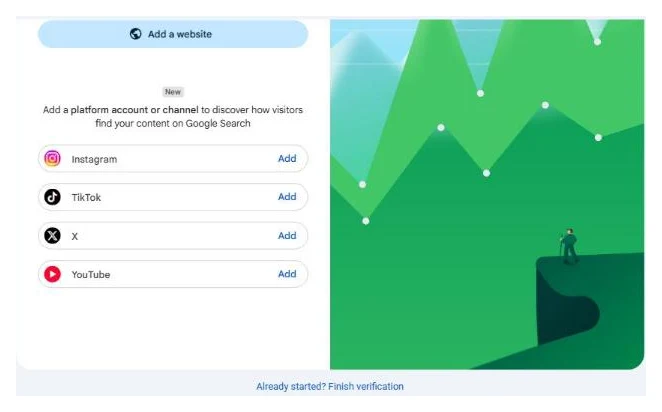
If the rows are missing, the rollout has not reached your account yet. Check back in a few days.
Step 2: Google’s consent screen
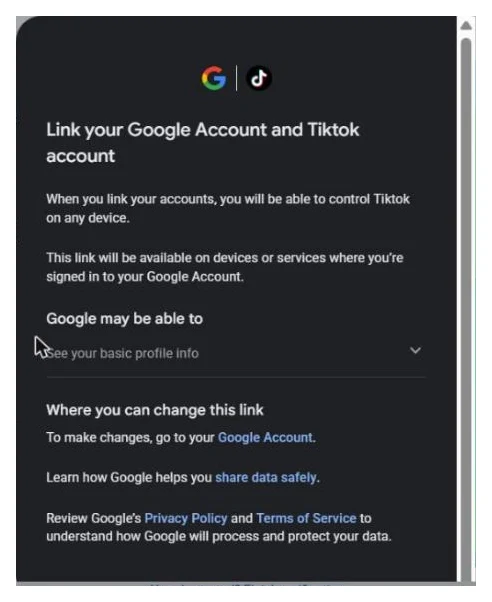
A dialog opens inside Search Console with the Google and TikTok logos: “Link your Google Account and Tiktok account”. It says the link will be available on devices and services where you are signed in to your Google Account, that Google may be able to see your basic profile info, and that you can change the link later in your Google Account. Scroll to the bottom and click Agree and continue.
Step 3: TikTok’s authorization popup
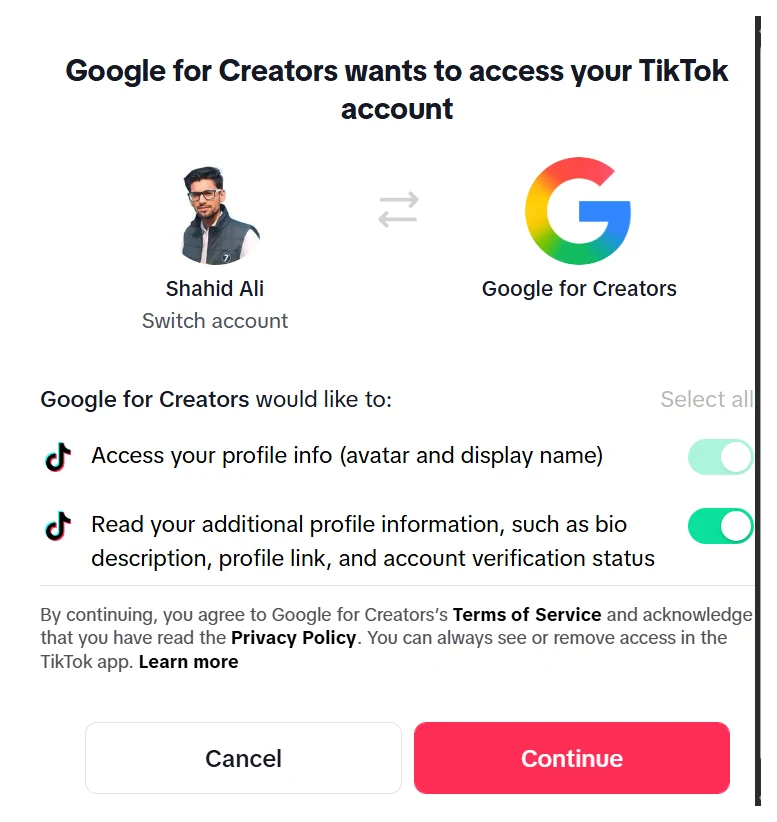
A new window opens at tiktok.com/v2/auth/authorize. Log in if you are not already, then TikTok shows “Google for Creators wants to access your TikTok account”, with your avatar and name on the left, a Switch account link under it, and Google for Creators on the right. Two permissions are listed and toggled on:
- Access your profile info (avatar and display name)
- Read your additional profile information, such as bio description, profile link, and account verification status
Check that the name on the left is the account you want, use Switch account if it is not, then click Continue.
The popup closes on its own.
Step 4: property added
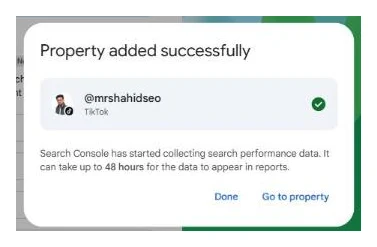
Search Console shows “Property added successfully”, your handle with TikTok under it and a green tick, and “Search Console has started collecting search performance data. It can take up to 48 hours for the data to appear in reports.” Click Go to property.
What you see next
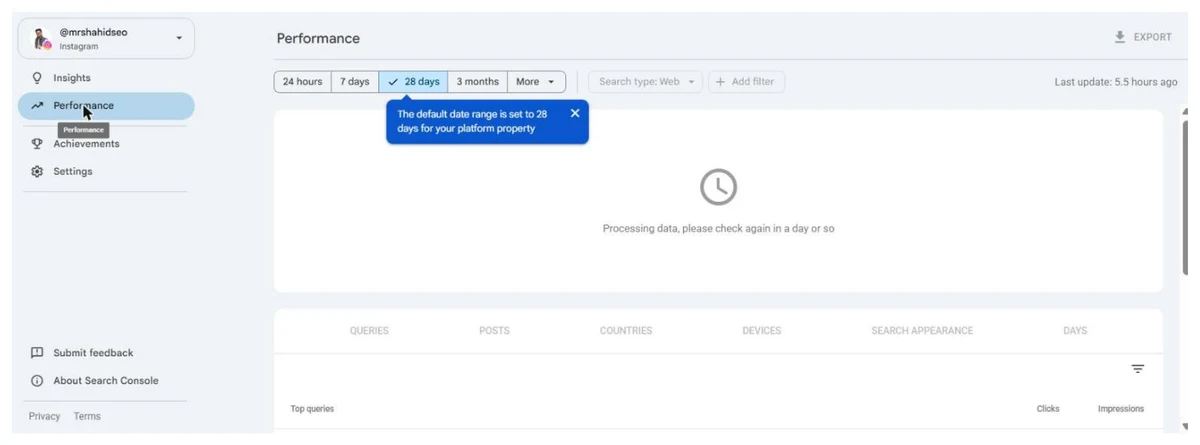
The property opens on Insights, and the left navigation has four items: Insights, Performance, Achievements and Settings. That is the complete list. Day one shows “We’re processing your data and gathering insights. Check back within 48 hours.” on Insights and “Processing data, please check again in a day or so” on Performance.
When data arrives, the POSTS tab lists individual /video/ URLs. Filter by post to see which videos surface, and read the QUERIES tab for the searches that surface them. Because TikTok videos mostly appear in Google’s short video carousel, expect high impressions and a low CTR. A video that plays inside Google’s own viewer counts as a click even when nobody reaches tiktok.com.
Managing the property
Settings has Users and permissions, and REMOVE PROPERTY. Add clients or teammates as users there rather than sharing the TikTok login. Search Console re-checks ownership periodically; if the TikTok authorization is revoked or expires, the property pauses until you repeat the flow, and data collection continues in the background.
Troubleshooting
| Symptom | Cause | Fix |
|---|---|---|
| No TikTok row on the Add property card | Rollout gap | Wait; nothing to request |
| Popup never appears | Popup blocked | Allow popups for search.google.com and click Add again, or use “Already started? Finish verification” |
| Wrong account in the popup | Different TikTok account signed in | Click Switch account in the popup, or log out and retry |
| Verified, empty after three days | Videos not surfacing in Google, or account private | Make the account public; put searchable words in titles and descriptions |
| Property paused | Authorization revoked or expired | Repeat steps 1 to 4 |
Related
Quick answers
Do I need a website to add TikTok to Search Console?
No. A TikTok account has been its own Search Console property type since July 2026. Verification is a TikTok login and an authorization click. Nothing on a website is involved.
What is Google for Creators and why is it asking for access?
Google for Creators is the name of the app Google registered with TikTok for this link. When you authorize it, TikTok grants Google read access to your profile info: avatar, display name, bio, profile link and verification status. That is enough for Google to match your account to the TikTok URLs it already shows in search. It cannot post, read messages or see analytics.
Do I need a certain number of followers?
Google has not published a minimum for platform properties. This is different from Google Search profiles, the public creator pages, where reported thresholds are around 300k followers on TikTok. My account is small and verified in one pass.
Why is my TikTok property empty?
Data takes up to 48 hours to appear. After that, empty means Google is not showing your videos for any query. TikTok videos surface mostly in the short video carousel, so accounts whose videos do not appear there see nothing. Public account, a title and description with searchable words, and topics people actually search for are the levers.
How do I disconnect Google from TikTok later?
In the TikTok app: Settings and privacy, Security and permissions, Manage app permissions, and remove Google for Creators. In your Google Account, remove the TikTok link under third-party connections. Either one pauses the Search Console property.
Can I add more than one TikTok account?
Yes, one property per account. Log out of TikTok in the popup window between accounts, or the second run will verify the first account again.