On 7 July 2026 Google added a third property type to Search Console. Next to URL-prefix and Domain properties there is now a platform property, which is an Instagram, TikTok, X or YouTube account. On 29 July Google said the rollout was complete and published a guide on reading the data. It is the first time Search Console has worked for someone who does not own a website.
I have read Search Console reports for clients every working day for four years, and this is the biggest change to the product since the Page indexing report. It is also being written up mostly as news. This guide is the practitioner version: what you get, what you do not get, how the counting works, and what to do with the numbers once they arrive.
What a platform property is, and is not
A platform property is your presence on one supported platform, one account at a time. Inside Search Console it shows as @handle with the platform name under it, and the property ID in the URL looks like sc-creator-profile:instagram.com/username or, for YouTube, sc-creator-profile:youtube.com/channel/<channel id>. It reports how that account’s content performs in Google Search, Discover and Google News, using the same clicks, impressions, CTR and position you already know from a website property.
It is not a connection between your social accounts and your website property. The two stay separate. It is not in-platform analytics either: TikTok views, Instagram reach and YouTube watch time never appear here. And it is not a ranking signal. Adding the property changes nothing about how Google treats your posts.
There have been three Google launches in eight months that people mix up, so here they are side by side.
| Social channels experiment (Dec 2025) | Search profiles (June 2026) | Platform properties (July 2026) | |
|---|---|---|---|
| What it was | Auto-detected social channels shown inside a website property’s Insights report | A public creator profile page in Google Search | A standalone Search Console property for one social account |
| Who got it | A limited set of websites, no opt-in | Large accounts only, reported thresholds around 100k followers (300k on TikTok) | Anyone who can log in to the account |
| Needs a website | Yes | No | No |
| Reports | Insights only | None, it is a public page | Performance, Insights, Achievements |
| Verification | None, Google detected the link | Claim flow in Search | Platform login, or automatic if you already claimed a Search profile |
Supported platforms are Instagram, TikTok, X and YouTube. Nothing else is listed and Google has said nothing about LinkedIn, Facebook, Threads or Pinterest.
Who can add one
The only documented requirement is that you can sign in to the platform account. Google has not published a follower minimum, a business-versus-personal account rule, a region list or an account age. If the four platform tiles appear under Add property for you, you can add one.
Two shortcuts:
- If you already claimed a Google Search profile, all the accounts verified there are added as platform properties automatically, with no separate verification step for each one.
- If a website property is already verified and Google associates the social account with it, the help doc lists “automated connection via an existing website property” as a verification path.
If the tiles are missing entirely, you are still in the rollout gap. Google said global on 29 July but the help pages still say “rolling out gradually” as I write this. There is nothing to request; check back.
Adding Instagram, TikTok, X or YouTube, step by step
I added my own Instagram, TikTok and YouTube accounts on 16 August 2026 and captured every screen. The three flows are not identical, so each platform has its own walkthrough: Instagram, TikTok and YouTube. The short version:
- Open Search Console and use the property selector, or go straight to the welcome page at search.google.com/search-console/welcome.
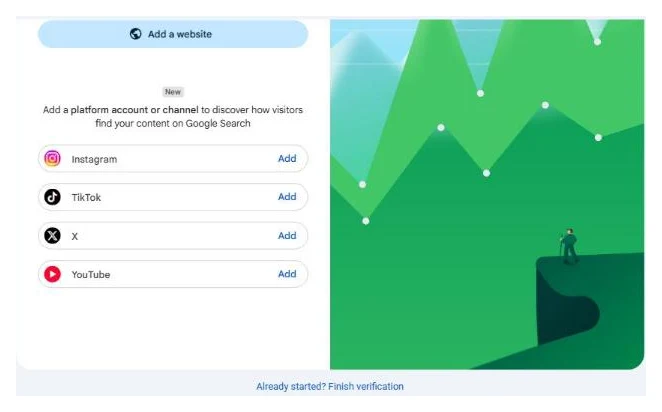
- Under “Add a website” there is a block marked New: “Add a platform account or channel to discover how visitors find your content on Google Search”, listing Instagram, TikTok, X and YouTube, each with an Add button. Pick one.
- Authorize the link. For Instagram and TikTok this is two screens: a Google consent dialog inside Search Console (“Allow Google access to your Instagram account” or “Link your Google Account and Tiktok account”), then a popup on the platform itself where you log in and click Allow or Continue. YouTube skips both. It reads the channels already linked to your signed-in Google account and shows a “Select a YouTube channel” list. Log in with the account that posts, not your personal account, or you will verify the wrong thing.
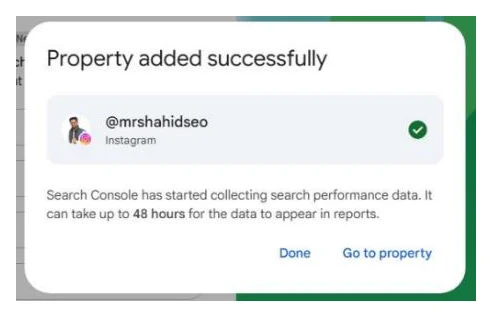
- You get “Property added successfully”, the handle with a green tick, and “Search Console has started collecting search performance data. It can take up to 48 hours for the data to appear in reports.” Click Go to property.
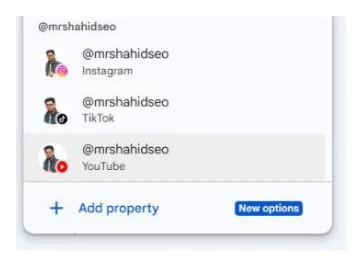
Repeat per account and per platform. Each one is a separate property, and the usual limit of 1,000 properties per Search Console account applies. In the property selector they group under the handle, so three accounts with the same name show as one group with Instagram, TikTok and YouTube rows.
Keeping it verified
Ownership is checked again periodically. If the platform session expires or someone removes your access on the platform, the property pauses. Verify again and the reports return immediately, with no new waiting period, because collection did not stop.
If you manage accounts for clients
There is no bulk verification. Someone with the platform login has to click through for every account, which for an agency with forty client accounts is forty logins. Do it once with a naming convention you can filter on later, because the property selector gets crowded fast. User management works like any other property: verify once, then add the people who need access. If you cannot log in to the platform yourself, ask the client to verify and add you as a user.
The three reports
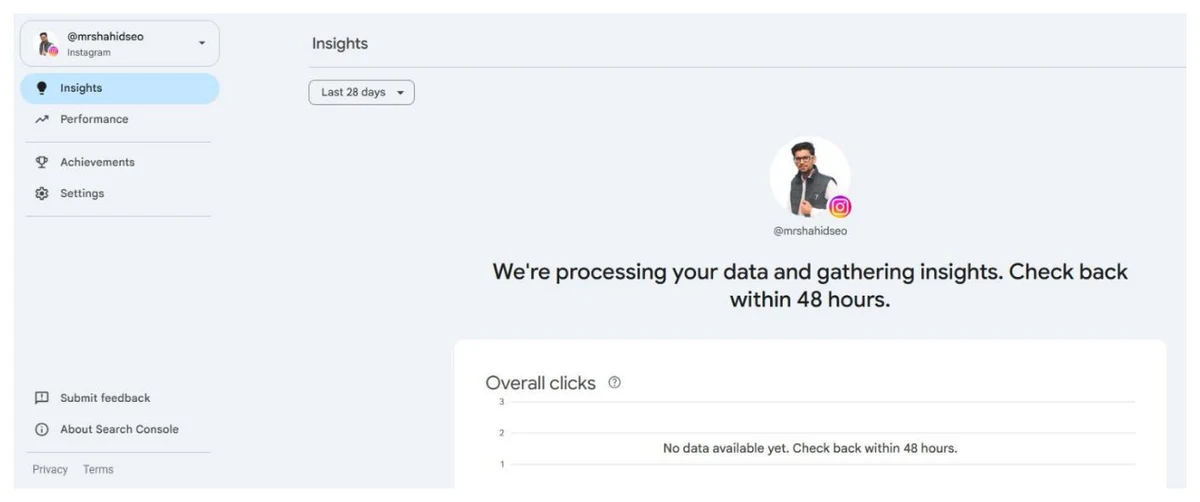
Open a platform property and the left navigation has four items: Insights, Performance, Achievements and Settings. That is the whole product. Nothing else from a website property is there.
Performance
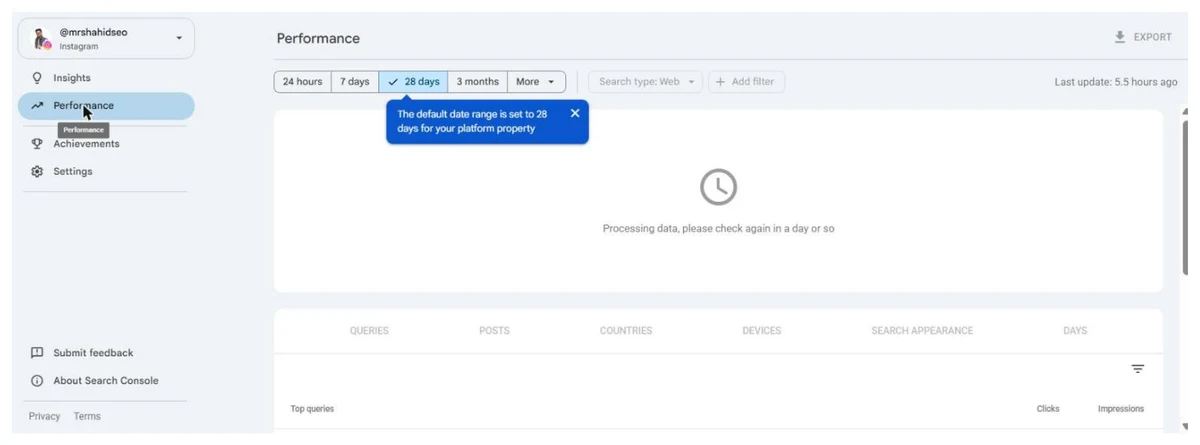
Clicks, impressions, average CTR and average position, filterable by post URL, query, country, device and date, with the 24-hour view available. The date buttons are 24 hours, 7 days, 28 days, 3 months and More, and a tooltip on first open says “The default date range is set to 28 days for your platform property”. The dimension tabs are QUERIES, POSTS, COUNTRIES, DEVICES, SEARCH APPEARANCE and DAYS. POSTS replaces the Pages tab you know from a website property, and it lists individual post, video or Reel URLs. Export sits top right, and a “Last update” stamp shows how fresh the data is.
Page filters and comparison mode work on the URL patterns each platform uses. On YouTube compare /watch against /shorts/. On Instagram compare /p/ against /reels/. On TikTok filter to /video/. Playlist rows show the playlist page itself, not the videos inside it.
Annotations work here too. If you rewrite the titles or captions on a batch of posts, drop a date marker so you can read the effect a month later.
Insights
A 28-day overview: total traffic, top-performing content, how people find you (top queries, trending up, trending down, grouped into query groups), and the countries your audience comes from.
One trap. The summary card at the top counts all clicks, including image, video and news results. The detail cards underneath cover web search only. So the cards can add up to less than the header. That is by design, not missing data.
Achievements
Milestones such as passing a new total-clicks threshold in the last 28 days. Nice to see, nothing to act on.
Settings
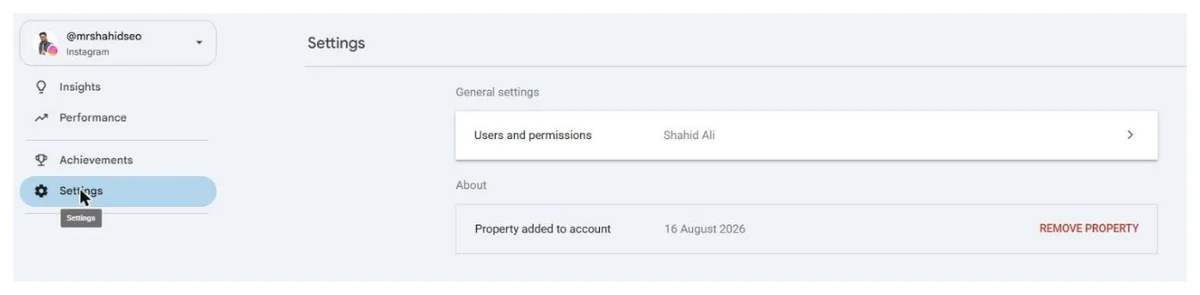
Two rows: Users and permissions, and a “Property added to account” date with a red REMOVE PROPERTY link. That is where you add a client or a colleague, and where you take the property away again.
What is missing compared with a website property
Google describes platform properties as focused on “reporting performance and traffic insights”, and that is what you get. There is no URL Inspection, no sitemap submission, no Page indexing report, no Enhancements, no Removals, no Core Web Vitals and no Links report. The four items in the left navigation above are the complete list. Every indexing tool that makes a website property useful for fixing things is absent, and none of the indexing statuses a website property reports exist here. If a post never earns an impression you have no way of asking Google why. To inspect a page on your website, switch back to the website property that covers it: a URL checked from any other property only returns URL is not in property.
Two more gaps that Google’s announcements are silent on: API access (nothing in the docs, and the property list from my own account’s API access shows only website properties) and historical backfill (Google does not say whether data appears from before the verification date). Treat both as unavailable until Google says otherwise.
How the numbers are counted
The metric names are the same as a website property. The counting is not quite.
- Instagram Stories shown in Search count as impressions, and a click on one counts as a click.
- A video surfacing in Search or Discover counts as an impression, and it counts as a click even when the video plays inside Google’s own viewer without sending anyone to the platform.
- Social content mostly appears in carousels: the short video carousel, the “Latest posts” carousel and the “What people are saying” unit. Positions in carousels behave differently from ten blue links, so do not read a position 4 here the way you would on a page.
Expect high impressions and low CTR. Carousels earn impressions on broad queries where most people scroll past. That is normal, and it is why the query report is more useful than the CTR figure.
Cross-checking with your website property
This is the part I care about, and it is the part nobody has written up. If you own a website and a YouTube channel or Instagram account, you now have two Search Console properties reporting on the same queries. Export the query tab from each and join them.
Three things fall out:
- Queries where both rank. Your page and your video are reinforcing each other on the results page. Leave them alone.
- Queries where the social post ranks and your site does not. That is Google telling you there is demand you have not built a page for. It is the cheapest keyword research you will do this year, and it comes with proof of intent.
- Queries where your page used to rank and now only the social post does. Check whether the page dropped, or whether a video carousel took the slot above it. The fix is different in each case, and the second one is not fixable from the website.
For the indexing side: you cannot request indexing for a Reel or a Short, and you cannot submit a sitemap for a channel. The only levers are on the platform. Public account, a title or caption that matches how people actually search, and the words in the caption rather than in the video, because that is what Google reads first. If a post never shows an impression after a few weeks, it is not indexed for any query anyone types, and the caption is the first thing to fix.
For creators with no website
For the first time you can see which Google searches send people to your account, and how that changes day to day with the 24-hour view. Use the query groups trending up to pick the next topic, and use the country breakdown to decide whether to caption in a second language.
Then, when the data shows steady search demand for a topic, that is the argument for a website you own. A platform property tells you what Google wants from you. A website property lets you fix it when Google stops delivering, and that is the tool the platform property does not have.
Troubleshooting
| Symptom | Likely cause | What to do |
|---|---|---|
| No platform tiles under Add property | Rollout gap on your account | Nothing to request; check again in a week |
| Authorization fails | Popup blocked, or logged in to a different platform account | Retry in a fresh window logged in as the posting account, or use “Already started? Finish verification” on the welcome card |
| YouTube channel not in the picker | Channel belongs to a different Google account or a Brand Account you are not a manager of | Sign in to Search Console with the Google account that owns or manages the channel |
| Property added, still empty after three days | Wrong account verified, or the account genuinely gets no Google impressions | Confirm the property name matches the posting account, then check the Search tab specifically |
| No Discover or News tab | No traffic from those surfaces yet | Expected, tabs appear once traffic exists |
| Insights cards do not add up to the header | Header counts all result types, cards count web only | Expected |
| Property paused | Periodic ownership check failed | Verify again, data resumes with no wait |
Sources
- Google Search Central, launch announcement, 7 July 2026
- Google Search Central, global rollout and analysis guide, 29 July 2026
- Search Console Help, About platform properties
- Search Console Help, Add a website or platform property
- Google Search Central, Analyze your social and video platform content performance
- Google Search Central, Social channels experiment, December 2025
Quick answers
Do I need a website to use Google Search Console now?
No. Since July 2026 you can add an Instagram, TikTok, X or YouTube account as its own property and verify it by logging in to that platform. This is the first time Search Console has worked without a website. You get Performance, Insights and Achievements for that account's content in Google Search, Discover and Google News.
Does adding my Instagram or TikTok to Search Console improve rankings?
No. A platform property is a reporting tool. It shows you how your posts already perform in Google. It does not change how Google ranks them, and it does not give you a Request Indexing button or a sitemap for social URLs. The lever is on the platform: public account, descriptive captions and titles, and posting on topics people search for.
Why is my platform property showing no data?
Google says data can take up to 48 hours to appear, and the help page says a few days. If it is still empty after that, check that you verified the account that actually posts, that you are on the Search tab rather than Discover or News, and that the account is public. Small accounts with posts that never surface in Google will legitimately show nothing.
Which platforms are supported?
Instagram, TikTok, X and YouTube. Google has not announced LinkedIn, Facebook, Threads or Pinterest, and there is no public roadmap. Each account or channel is a separate property, so a brand with two Instagram accounts and one YouTube channel adds three properties.
What is the difference between a platform property and a Google Search profile?
A Search profile is a public creator page in Google Search, and it is only offered to large accounts. A platform property is a private reporting view inside Search Console that anyone with the account login can add. If you already claimed a Search profile, your verified accounts are added as platform properties automatically.
Can I use the Search Console API for platform properties?
Google's announcements and help pages do not mention API or BigQuery access for platform properties, and I could not confirm it in my own account as of mid August 2026. Treat it as unavailable until Google documents it. Standard Performance report export works, and comparing platforms means exporting each property and merging in a spreadsheet.
Why did my property pause and ask me to verify again?
Search Console periodically re-checks that you still control the platform account. If the platform login expires or access is removed, the property pauses until you verify again. When you do, the same reports come back with no waiting for data to build up.