Short answer: no, not as a count, and Google says so itself. As a rough signal it is still useful, and I run it most days. The trouble starts when people treat “About X results” as an index audit and make decisions with it.
I check index status for a living. Nearly every site owner who messages me has already run a site: search, seen a number they did not like, and drawn a conclusion from it. About half the time the conclusion is wrong, and the page they were panicking about was indexed all along.
What Google says about site: counts
Google’s documentation for the operator is not shy about this. It states that “the site: operator doesn’t necessarily return all the URLs that are indexed”, that “the list of URLs returned is not always exhaustive”, and that “bigger sites shouldn’t expect to see all their URLs in the results”.
John Mueller put it more bluntly in the Ask Googlebot series, answering a site owner who could find 180 of their URLs individually but saw only 28 in a site: search. As quoted by Search Engine Journal, a site: query “is not meant to be complete, nor used for diagnostics purposes”.
Gary Illyes said much the same on the Search Relations podcast, again reported by Search Engine Journal: “the site thing shows me some of the pages that are indexed”.
Three statements, one message. It shows some. It was never built to show all.
What the operator actually is
This is the part that explains everything else. Google’s docs say the operator “was designed primarily for search users”, meaning people who want to search within a site they already know about. Site owners repurposed it as a diagnostic tool. Google never designed it for that job and has never claimed it does that job well.
Once you hold that in your head, the limitations stop looking like bugs and start looking like a tool being used for the wrong thing. A tape measure is not inaccurate because it makes a poor thermometer.
Why the number changes every time you search
Six reasons, and most of them are not Google being flaky.
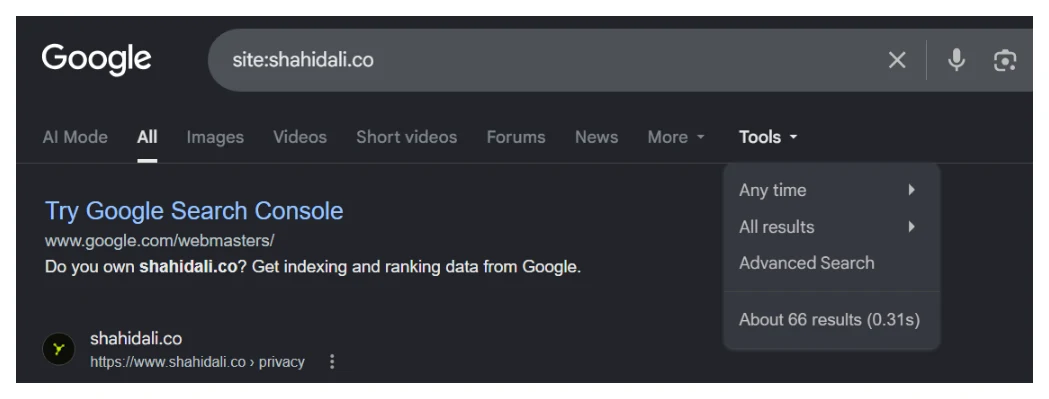
- The count is an estimate. Google has described it as “a rough estimate of how many pages have been indexed” since at least a 2009 Search Central post. It is generated for speed. It is not a counter being read.
- The results are not ranked. Google’s docs say that beyond showing the shortest URL for the prefix first, “the results are relatively random”. Do not read priority into the order, and do not assume the first page of results is your most important content.
- Index selection is dynamic. Canonicalisation, deduplication and quality filtering all change which URL serves for a given piece of content, and they change over time.
- Personalisation and signed-in state shift results.
- Refresh timing differs across Google’s systems.
- You changed the query without realising. Google’s documentation explicitly warns that
site:https://www.example.comdoes not return the same results assite:https://example.com/. A protocol, awww, or a trailing slash is a different query. A meaningful share of “the number keeps changing” reports are this.
Does site: show all indexed pages?
No, and the error runs in both directions, which almost nobody mentions.
When site: shows fewer pages than you have
- The result list is not exhaustive, by documentation.
- Larger sites are explicitly told not to expect full coverage.
- Filtering and deduplication remove near duplicates from what serves.
- Deep, low traffic and recently published URLs are the first to go missing from the sample.
When site: shows more than Search Console
- Subdomains are included. Google’s own example for
site:example.comreturns results fromwww.example.comand from arecipes.example.comsubdomain. A URL prefix property in Search Console does not cover subdomains, so the operator is looking at a bigger set than your property is. - Parameter and non canonical URLs can surface.
- A domain property and a URL prefix property cover different populations.
- URLs can be indexed that fall outside the property you are comparing against.
This second list is why “site: says 1,200 but Search Console says 800” is usually not a discrepancy at all. You compared two different questions.
site: versus URL Inspection versus the Page indexing report
Three tools, three different jobs. Getting this wrong is the actual root cause of most index confusion I see.
The part people miss is that the two Search Console tools are not interchangeable either. Google’s Page indexing report documentation says the report “isn’t used to investigate the index status of specific pages” and tells you to “find the index status of a specific page, use the URL Inspection tool”. It also notes that its example URL lists are capped and are not guaranteed to show every URL in a given status, so Search Console has sampling limits of its own.
How to check indexed pages accurately
In order of authority, which is not the same as order of convenience.
- URL Inspection, for one URL. This is the per URL source of truth. Google describes the tool as providing “information about Google’s indexed version of a specific page”. Note that the first result you see is the stored index record, not a live fetch. The live test is a separate button and answers a different question.
- The URL Inspection API, for a list. The same verdict, in bulk, at up to 2,000 URLs per property per day. This is the only accurate way to audit indexing at scale, and it is exactly what the free bulk URL inspection tool on this site runs. Paste a list or point it at a sitemap and you get Google’s own wording per URL.
- The Page indexing report, for site level totals and reasons. Good for spotting that 400 URLs are sitting in crawled, currently not indexed or discovered, currently not indexed. Bad for answering questions about one page. Each status the report gives you has its own meaning and its own fix, and if the question behind the site: search was really “why is this page not in yet”, the timeframes are here.
- Sitemap scoped reporting, when you want indexed counts per sitemap rather than per site.
site:with a full exact URL, as a five second smoke test with no login. Useful. Indicative only. Never the final word.
The workflow I actually use on client sites is the second one, every morning, because a per URL ledger is the only thing that survives contact with a real catalogue. That is the whole method behind a 118-day indexing job, and none of it would have worked on site: counts.
When Search Console and site: disagree, reconcile them like this
This is the question that fills the Search Console community forums. Someone has 136 pages reported as indexed and a site: search returning seven results, and they want to know which number is lying. Neither is. Work through it in this order and the gap usually explains itself.
Check the property type first. A URL prefix property covers only URLs under that exact prefix. A domain property covers everything including subdomains. site:example.com covers subdomains regardless. If you are comparing a prefix property against a bare domain query, you are comparing two different sets of pages and the numbers were never going to agree.
Then match the query to the property exactly. Add the protocol and the www if your property has them. site:https://www.example.com/ and site:example.com are different questions.
Then stop comparing totals. The site: estimate and the Page indexing count are produced by different systems for different purposes, and Google called that discrepancy by design back in 2009. There is no reconciliation to reach, and hours have been lost trying.
Then check the pages you actually care about. Take ten important URLs and inspect them individually, or run the whole list through the API. A per URL answer for the pages that matter is worth more than a matched total across pages that do not.
When site: is still genuinely useful
I am not telling you to stop using it. I am telling you to stop measuring with it. It is good at:
- Spotting hacked content.
site:example.com casinofinds injected spam pages fast. - Checking a section exists at all.
site:example.com/blog/tells you in seconds whether Google has anything from a subfolder. - Finding stray subdomains you forgot about, including staging servers that should never have been public.
- Sanity checking a competitor’s footprint at a glance, since you have no Search Console access there.
- Catching duplicate titles and snippets across a section, just by scanning the results.
- Confirming a single specific URL is out there, with the full URL in the query.
Every one of those is a yes or no question, or a discovery question. None of them is a count.
Myths worth correcting
Myth: Google’s 2006 blog post admits the operator is unreliable. This is the most repeated claim in this topic and it is wrong. That post documented two specific, time boxed bugs during a supplemental results refresh, one affecting queries with a trailing slash and one affecting domains containing punctuation. Google said fixes were rolling out within days, and stated plainly that “this bug doesn’t involve any pages being dropped from the index”. It is a 2006 incident report, not a standing policy statement. Google’s current position is in the operator documentation, and it is clear enough on its own without misquoting a twenty year old bug notice.
Myth: the “About X results” number is your indexed page count. It is a rough estimate and has been described that way by Google since 2009.
Myth: if a page is missing from site:, it is not indexed.
Absence is not evidence. Inspect the URL.
Myth: site:example.com excludes subdomains.
It does not, and Google’s own documentation example proves it.
Myth: site: and Search Console should match. Google called the discrepancy by design in 2009. They measure different populations.
Myth: the Page indexing report is the authoritative check for one page. Google’s documentation for that report says the opposite, in writing.
Myth: clicking through to the last page of results gives you the true count. This folk method is everywhere and Google has never documented it as accurate. I would not build a decision on it.
So what do you actually do
If you came here because a site: search made you nervous, do this in order. Search a full exact URL rather than the domain. If that returns nothing, inspect the URL in Search Console for the property that genuinely covers it. If the inspection says the URL is not indexed, you now have a real problem with a real status attached to it, and the status tells you which fix applies. If you have more than a handful of URLs to check, run the list through the bulk checker rather than typing them one at a time.
What you should not do is count results and plan a quarter around the number. That is the one job this tool was never built for, and Google has been saying so, in public, for a very long time.
Quick answers
If a page does not appear in a site: search, does that mean it is not indexed?
No. Google's documentation states that the operator does not necessarily return all the URLs that are indexed, and that bigger sites should not expect to see all of theirs. Absence from a site: result is not evidence of anything. Inspect the exact URL before you conclude the page is missing, because acting on a site: gap is how people end up rewriting pages that were indexed the whole time.
Why does site: show a different number every time I search?
Because the count is an estimate generated for speed, not a query against a counter. It also moves when you change the query without noticing. Google's own docs warn that site:https://www.example.com and site:https://example.com/ return different results, so a protocol, a www, or a trailing slash is enough to change the answer. Personalisation and signed-in state can shift it too.
Does site:example.com include subdomains?
Yes. Google's documentation example for site:example.com shows results from both www.example.com and from a recipes.example.com subdomain. This matters because a URL prefix property in Search Console does not cover subdomains while the operator does, which is one of the main reasons site: sometimes reports more than Search Console.
Which is right when site: and Search Console disagree?
They are answering different questions, so disagreement is expected rather than a fault. Google addressed this in 2009 and called the discrepancy by design. For the index status of one specific page, Google's own documentation points you at the URL Inspection tool, and the Page indexing report documentation says plainly that the report is not used to investigate specific pages.
Is the site: operator broken or deprecated?
Neither. It is actively documented by Google and it works exactly as designed. The problem has always been that SEOs use it as a measurement tool when it was built as a search feature for people looking for something on a site. Judged against what it is for, it is fine. Judged as an index audit, it was never going to hold up.
How do I check indexing for thousands of URLs at once?
The URL Inspection API returns Google's own per URL verdict in bulk, at up to 2,000 URLs per property per day. That is the only accurate way to check indexing at scale, and it is what the free bulk checker on this site runs. A site: query cannot do it at any volume, because it does not return per URL answers in the first place.