Search Console has about twenty indexing statuses. Each one says where a URL sits between undiscovered and indexed, and who made that call. Roughly half are your own settings working correctly, and only four or five actually cost you traffic.
I sell manual indexing work, so I have an interest in you deciding something is broken. I am going to tell you plainly which statuses are not broken anyway, because the fastest way to waste a month is to spend it fixing a report row that was never a problem.
The table
Two places show you these statuses. The Page indexing report groups all your non-indexed URLs by reason, which is what you want for triage. URL Inspection answers for one URL at a time, in more detail, and it is the only place some of these strings ever appear. The “Where it appears” column tells you which.
One knock-on effect worth knowing before you read the table: a URL that is not indexed will never carry field data either, because Google states that only indexed URLs can appear in the Core Web Vitals report. If a page is missing from both, the “not enough data” screen is a symptom and the status below is the cause.
| Status | Where it appears | What it means | Is it a problem? | Fix |
|---|---|---|---|---|
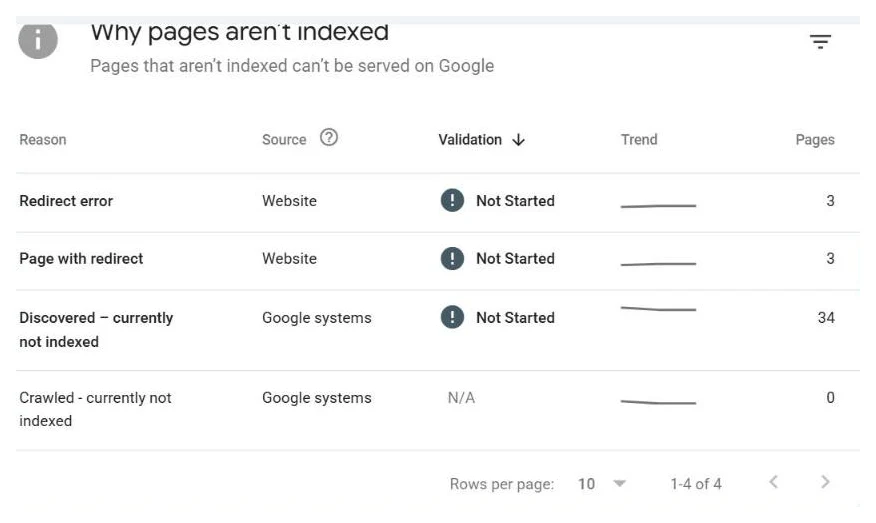
| Crawled - currently not indexed | Both | Google fetched the page, read it, and chose not to index it | Yes. This is the expensive one | Make the page worth storing, or merge it into a stronger one. Why Google declined |
| Discovered – currently not indexed | Both | Google knows the URL exists and has not fetched it yet | Yes, once it has lasted weeks | Link it from pages Google already crawls, and check your server response times. Full causes |
| URL is unknown to Google | URL Inspection only | Google holds no processed record of this URL at all | Yes, for any page that should be live | Put the URL in your sitemap and link to it from a crawled page, then request indexing once. Longer version |
| URL is not on Google | URL Inspection only | A verdict, not a reason. The URL is not in the index; the reason sits under it | Depends on the reason underneath | Ignore the headline and read the Page indexing panel below it, then fix that reason. How to read it |
| URL is not available to Google | URL Inspection live test | The live fetch failed. Blocked, errored, redirected badly, or timed out | Yes, always. Google could not see the page | Run Test live URL and read the Availability section. Clear the robots rule, the 5xx, or the login wall it names. Each cause |
| Page with redirect | Both | This URL redirects, so Google indexed the destination instead | No, if you meant the redirect | Confirm the destination is the page you want. Otherwise nothing. My full read of Page with redirect separates the fine cases from the real ones |
| Redirect error | Both | A loop, a chain that ran too long, or an empty redirect target | Yes | Collapse the chain to a single hop at the server, then re-inspect |
| Excluded by ‘noindex’ tag | Both | The page carries a noindex meta tag or header | No if you meant it, yes if you did not | Remove the directive only if the page is meant to rank |
| Blocked by robots.txt | Both | robots.txt tells Google not to fetch this URL | Usually no for filters and internal paths | Unblock only real content. Do not use robots.txt to hide pages from the index |
| Indexed, though blocked by robots.txt | Both | Google indexed the URL from links pointing at it, without ever fetching it | Yes. You have a page in the index Google cannot read | Unblock it in robots.txt so Google can fetch it, then add noindex if you actually wanted it out. A noindex on a disallowed page is never read, which is why you unblock before you noindex |
| Indexed, not submitted in sitemap | Both | The page is indexed. Google reached it through links, and no submitted sitemap lists it | No. It is indexed, which was the goal | Nothing urgent, but it means your sitemap and your site disagree. Add the URL to the sitemap so the two match, and check what else the sitemap is missing |
| Alternate page with proper canonical tag | Page indexing report | The page names another URL as canonical and Google agreed | No. This is canonicalization working as designed | Nothing, in almost every case. The exception, a template bug pointing a whole section at one canonical, is in Alternate page with proper canonical tag |
| Duplicate without user-selected canonical | Page indexing report | Google found near-identical pages, you declared no canonical, so Google picked one | Sometimes. Check which one it picked | Declare the canonical yourself, or make the pages genuinely different |
| Duplicate, Google chose different canonical than user | Both | You declared a canonical and Google overruled you, indexing another URL instead | Sometimes. It usually means your two pages are more alike than you think | Inspect the URL to see which one Google picked. Either accept it, or differentiate the pages enough that your declaration is credible |
| Soft 404 | Both | The URL returns 200 but the page reads as empty, missing, or an error | Yes | Add real content, or return a real 404 if the page is gone. The difference between a 404 and a soft 404 is the status code, not the wording on the page, and what Google checks on a soft 404 covers why single-page apps produce them in bulk |
| Server error (5xx) | Both | Your server failed on Google’s request | Yes, urgent. Crawling slows site-wide | Fix hosting or the application error first, before anything else on this list |
| Not found (404) | Page indexing report | The URL returns 404 | Usually no. Deleted pages are supposed to 404 | Only act if the page should exist. Then restore it or redirect it to the closest live page. My full triage for Not found (404) in Search Console sorts the list into redirect, leave, and ignore |
| Blocked due to unauthorized request (401) | Both | The URL demands credentials Googlebot does not have | No for a real members area, yes for public pages | Check it is not your whole staging or live site behind an auth wall. Make the public URLs genuinely public. Do not let Googlebot past a wall your visitors still hit, because serving the crawler a page users cannot see is cloaking |
| Blocked due to access forbidden (403) | Both | The server refused Googlebot outright | Usually yes. Public pages should not 403 | Almost always a firewall, WAF, bot rule or CDN rule blocking Google. Verify the request really came from Googlebot, then allow it |
| Blocked due to other 4xx issue | Both | The server returned a 4xx that is not 401, 403 or 404 | Usually yes, unless it is a deliberate 410 | Fetch the URL yourself and read the actual code. A 410 for a deleted page is fine. A 429 means you are rate-limiting Googlebot, and a 400 usually means a malformed URL something on your site is linking to |
| Blocked by page removal tool | Page indexing report | Somebody used the Removals tool, which hides the URL for about six months | No if you meant it, yes if you inherited it | Check Removals in the left menu and cancel the request. Removal expires on its own, so use noindex for anything permanent |
One oddity in that first column, so you do not read it as my typo: Google’s own interface is inconsistent about the dash. It writes Crawled - currently not indexed with a plain hyphen and Discovered – currently not indexed with an en dash, in the same report, in the same table. I have reproduced both exactly as they render, because the entire point of the Status column is that it matches the string in front of you.
Why the “is it a problem” column matters more than the rest
Open any Page indexing report and the not-indexed number is frightening. On a mid-size site it is routinely five or ten times the indexed number. Almost every owner reads that as five thousand broken pages.
It usually is not. The bulk of that number is normally made up of four rows: Alternate page with proper canonical tag, Excluded by ‘noindex’ tag, Not found (404) and Page with redirect. Every one of those is a decision somebody made on purpose. Faceted URLs consolidating onto a canonical, tag archives you noindexed, products you deleted last year, an old URL structure redirecting to the new one. A site with none of those rows would be the strange one.
So the first job is subtraction. Strip out the intentional rows and look at what is left. On most sites what is left is much smaller and much more actionable, and it clusters into two groups:
Google has not seen the page. Discovered – currently not indexed and URL is unknown to Google both mean nothing about your page has been judged, because the page has not been read. These are priority and discovery problems: internal links, sitemaps, server speed. They respond well to structural work.
Google has seen the page and said no. Crawled - currently not indexed is the one status that is genuinely a verdict on your content. Google spent the fetch, read the page, and decided the index is better without it. Resubmitting does not change a verdict. Only changing what the page is worth does.
That distinction is the whole reason this cluster exists, and if you only take one thing from this page, take that one. A discovery problem and a rejection problem produce similar-looking rows and need completely opposite work. The single URL Inspection field that tells the two apart, Last crawl, is covered in the crawled-not-indexed guide.
Store owners see both groups more than anyone. Product catalogues are the least favourable shape for indexing: many URLs, similar templates, descriptions pasted from a manufacturer feed. Google samples a catalogue rather than committing to all of it. Two catalogue jobs in my case studies show where that can end up: a pet products store now at 75 of 75 URLs indexed and a college dorm store at 295 of 295, and neither started anywhere near full coverage.
The status the report never shows: dropped out
There is no row called “dropped”. A page that was indexed and then lost its place simply turns up under one of the reasons above, and nobody gets an email. Indexing is a lease, not a purchase: Google re-crawls and re-judges every stored page, and a page that stops justifying its slot loses it. Traffic sags, a customer mentions they could not find you, and by the time someone opens Search Console the indexed count has been sliding for two months.
The Performance report is the quickest tell. If a URL that is now unknown or not indexed ever recorded impressions, Google knew it and let it go, so you are fixing crawl demand and page value, not discovery. The causes follow a predictable order: something changed on the site, the server started struggling, or the content got re-judged against a bar that moves every year. The checklist is in why Google dropped your pages.
The two reports disagree, and that is normal
People lose hours to this, so it is worth being explicit.
The Page indexing report is a stored snapshot. It is built from Google’s last processing pass over your site and it lags, sometimes by days, sometimes longer. It is a historical record, not a live view.
URL Inspection reads Google’s current index record for one URL. The Test live URL button inside it goes further and fetches the page from your server right now, with no cache in between.
So a page you fixed yesterday can show a clean live test, a stale index record, and a wrong row in the report, all at the same time, and none of those is a bug. The live test is the only one telling you about today’s page. When you want to know whether a fix landed, use the live test. When you want to know whether Google has acted on it, wait and re-check the report.
Two common causes worth naming, because they account for a large share of the rows in the middle of this table on real sites. On WordPress, paginated archive URLs land in Crawled - currently not indexed as their healthy resting state, and in Excluded by ‘noindex’ tag or Alternate page with proper canonical tag when a plugin setting or a migration put them there, which the WordPress /page/2/ question unpicks. And when a whole sitemap’s worth of URLs sits in the not-indexed half while the Sitemaps report shows Success, that is the two reports answering different questions, covered in sitemap submitted but not indexed.
One more thing that trips people up: the report and inspection can be looking at different URLs. Trailing slashes, uppercase, www, http, and tracking parameters are all separate URLs to Google. If a status makes no sense, check you inspected the exact string in your sitemap. And if the sitemap itself is the suspect, the sitemap checker opens up to 500 of the URLs it lists and reports the ones that redirect, carry noindex, canonical elsewhere or are blocked by robots.txt, with no login.
The triage order
The order below is the one I actually run on client jobs, and the sequence matters more than the individual steps. Doing step six before step five is the single most common wasted effort in indexing work.
- Open the Page indexing report and read the not-indexed total without reacting to it. It is not a bug count.
- Group by reason. The report already does this. Sort the reasons by URL count so you know where the mass actually is.
- Cross off the intentional groups. Noindexed, canonicalized, 404s, redirects. If those are your own choices working, they are done. Spot-check a handful of URLs from each to confirm they really are your choices, then leave them alone.
- Inspect one URL from each remaining group. One, not fifty. Every URL in a group is there for the same reason, so the diagnosis you get from the first one usually holds for the rest. Run the live test while you are in there.
- Fix the cause, not the symptom. Server errors before anything else, because they throttle crawling everywhere. Then redirects and soft 404s, which are mechanical. Then the content and internal linking work behind Crawled and Discovered, which is slower and matters most.
- Request indexing once per fixed URL, and only after the fix is live. Once is the whole instruction. Repeat submissions do not add weight, and requesting indexing on an unfixed page is how people spend a month confirming that nothing changed.
- Re-check after a week. Use URL Inspection for the specific URLs you fixed, and give the Page indexing report longer, because it lags. Then repeat from step two on whatever is still there. On an established site a fixed page is usually picked up within hours to a few days, on a young site weeks is normal, and a page held back by a real quality problem does not index on any timeline until the cause is fixed. How long Google takes to index has the tracked timelines.
If you do not know which group your site is in yet, why pages are not showing on Google is the wider version of this triage, written for someone who has not opened the report before.
What the report will not do for you
Here is the gap that sends most people looking for tools. The Page indexing report groups URLs by reason, but it will not answer the question you usually actually have, which is: here are my forty priority URLs, tell me the status of each one. You cannot hand it a list. You can only browse its groups, or inspect one URL at a time, at roughly a click every few seconds.
That is why I built the bulk URL inspection tool. Paste a list, get a per-URL status back from the official Search Console API. It is free, and worth one sentence of explanation: it runs entirely in your browser against your own Google account, so the list of URLs you paste is never sent to a server of mine. For anyone auditing a client site or a property they do not own outright, that property is not a detail.
When to stop reading statuses and start fixing pages
Statuses are a diagnostic layer, not the work. Reading them tells you which of a small number of real problems you have. The pair that gets misread most often is discovered vs crawled, currently not indexed, where the wrong reading sends you editing pages Google has not looked at yet. After that the job is ordinary: make the server reliable, make your internal links point at the pages that matter, make the thin pages worth indexing, and submit each fixed URL once.
Most sites can do that themselves with this page and the five guides it links to. If yours is a backlog of hundreds and you would rather someone else worked through it, that is the job I sell: cause diagnosed in plain English, fixed, every URL pushed by hand, and a per-URL ledger with dates so you can watch the count move. Send me the property and I will tell you which rows in your report are real, free, usually within a day.
Quick answers
Which Search Console indexing statuses actually need fixing?
Fewer than people expect. Excluded by 'noindex' tag, Alternate page with proper canonical tag and Duplicate without user-selected canonical are usually your own choices working correctly. Crawled - currently not indexed, Discovered – currently not indexed, Server error and Redirect error are the ones that cost you traffic, and they are the ones worth your week.
Where do I see all of these statuses at once?
The Page indexing report, under Indexing in the left menu, groups every non-indexed URL by reason. URL Inspection tells you about one URL at a time and gives you more detail on that URL, including the live test. The report is for triage; the inspection is for diagnosis.
Why does the Page indexing report disagree with URL Inspection?
Because they are reading different things. The Page indexing report is a stored snapshot that lags by days. URL Inspection reads Google's current index record, and the live test fetches the page right now. A page you fixed yesterday can be correct in the inspection and still wrong in the report.