Crawled, currently not indexed means Google fetched your page, read it, and decided not to store it. Nothing is broken and it is not a penalty. It is a quality judgment on that page, and it gets re-made when the page changes.
You open Search Console, check a page you care about, and get the status that annoys site owners more than any other. Nothing is marked as broken, there is no error to fix, and the page just sits there.
Most advice about it stops at “improve your content quality”, which is true and useless. This guide is the procedure I actually run on client sites: pull the list, cut the list, work out which of four causes you have, fix that one.
Google declined the page, so fix the page
Google declined the page on quality, so the fix is the page, not another submission. In my client ledgers the cause is almost always one of four things: thin content, near-duplicate pages, weak internal linking, or a site whose overall standing makes Google index selectively. Fix the cause, resubmit once, and the status usually moves. Resubmit without changing anything and it usually does not.
Indexing is a two-step decision
Crawling and indexing are separate things. Crawling means Google fetched the page. Indexing means Google decided the page is worth storing in its index, which is what makes it eligible to appear in results at all.
Crawled, currently not indexed means step one happened and step two did not. It is Google saying: I saw this page, and I am choosing not to keep it right now. The word “currently” is genuine, because the decision gets revisited as your site changes. And if your status says Discovered instead of Crawled, Google has not even fetched the page yet, which is a different problem with different fixes.
One consequence worth stating plainly, because people ask it every week: a page in this status cannot rank for anything. It is not stored, so there is nothing to return. If Search Console says this and you can still find the page in Google, you are looking at two different URLs. Check the trailing slash, the protocol, and any parameters, then inspect the exact string Google shows you rather than the one you typed.
Check the Last crawl field before anything else
Crawled and Discovered are the pair people mix up most, and the mix-up is expensive because they need opposite fixes. Google’s Page indexing report help defines them in one line each. Discovered - currently not indexed: “The page was found by Google, but not crawled yet.” Crawled - currently not indexed: “The page was crawled by Google but not indexed. It may or may not be indexed in the future; no need to resubmit this URL for crawling.”
The fastest way to tell which one you are looking at is the Last crawl field in URL Inspection, which Google’s URL Inspection documentation describes as “The last time this page was crawled by Google”. Empty means Discovered. A date means Crawled. If the field is empty, nothing on the page can be the cause yet, and nothing you change on the page will register until Google fetches it.
Two more readings are worth taking in the same pass. The live test reports a crawl purpose of Discovery or Refresh, which tells you whether Google still treats the URL as new or as a known page it fetched again and turned down. And Settings, then Crawl stats, shows host status and average response time. A pile of Discovered URLs behind a green host status and quick responses is a demand problem, not a server problem, and the fix moves from hosting to internal linking.
When a batch moves from Discovered into Crawled, do not report it as a win. Google’s crawl budget documentation says “not every page that is crawled will necessarily be indexed”, so the move swaps a queue problem for a quality problem. The number that matters is how many reach Indexed.
This is why I classify every URL on a new property by exact status before deciding what kind of job it is. The skincare brand with seven country storefronts lands almost entirely in Discovered at every new launch, because a fresh domain has no history and Google fetches it cautiously, and the fix there has never once been a content edit. The rest of this guide is for the other shape: pages with a crawl date and no place in the index.
Step 1: pull the list of affected URLs
Do this before you form any theory, because one page is not a diagnosis.
In Search Console, open Indexing, then Pages. Scroll past the chart to the table headed Why pages are not indexed and click the row Crawled - currently not indexed. That opens the drilldown: the affected URLs, when each was last crawled, and an export button.
Two things about that export are worth knowing before you rely on it.
It caps at 1,000 rows. If the status counts 4,000 pages, the export hands you a quarter of them and gives no indication of how it chose. On a big catalogue this is the difference between fixing the pattern and fixing whatever happened to be sampled.
The dates matter more than the URLs. The last-crawled column tells you whether Google has looked recently. A page last crawled four months ago and a page crawled yesterday are in the same status for different reasons, and only one of them has seen your changes.
If the count is larger than the export, work from your sitemap instead of the sample. The free bulk inspector reads a whole sitemap in your browser and reports the real status for each URL, so you get the full distribution rather than the first thousand rows. Nothing is uploaded anywhere; it runs against your own Search Console session.
Step 2: cut the list down before you fix anything
This is the step everyone skips, and skipping it is why the work feels endless.
A large share of what sits in this status is Google being right. Those pages were never meant to be indexed, nothing is wrong, and rewriting them is wasted money. Sort the export into two piles.
Expected residue, leave it alone. Feed URLs, which arrive in bulk on WordPress and are the report working correctly. Internal search results, the /?s= rows, covered in WordPress search result pages in Google. Filter and sort parameter URLs. Tag archives that hold one post. Deep pagination. Attachment pages, which upgraded WordPress sites kept when 6.4 turned them off for new installs only: one page per uploaded image, holding an image and nothing else.
Pages you need indexed. Anything with a commercial job: products, categories, services, locations, the articles you wrote to rank. These are the only rows worth a minute of your time.
On most sites this cuts the list by more than half, and on a WordPress catalogue it can cut it by ninety percent. What remains is small enough to look at page by page, which is the point. If the remainder is still enormous, that is itself the finding: a template is producing pages nobody needs, and the fix is upstream of any individual URL.
Step 3: work out which of the four causes you have
Now take the surviving list and answer one question per page. Each cause leaves a different signal, and the signals are things you can check rather than things you have to feel.
Thin content. Open the page and compare it against the pages currently ranking for its query. Not word count, coverage: do the ranking pages answer questions yours does not? Category pages with two products, location pages with three sentences, tag archives with no text. The tell is that you can read the whole page in under fifteen seconds and learn nothing you could not have guessed from the title. On e-commerce sites the gap is usually real category descriptions and product detail instead of boilerplate; on local service sites it is location pages with genuinely local content. Length does not save a page that answers a different question than the query it is competing for, so check intent as well as depth.
Near duplicates. Take a distinctive sentence from the page, search it on your own site in quotes, and see how many pages come back. Product variants, city pages that swap only the city name, printer-friendly versions. The tell is that two or more of your own URLs would satisfy the same search equally well. Google keeps one and declines the rest, and it does not always keep the one you would have picked.
Weak internal linking. Count the links pointing at the page from your own site, and note where they come from. A page reachable only from a sitemap or from page nine of an archive has nothing vouching for it. The tell is that you cannot reach the page from your homepage in three clicks without using search. Your own internal links are the cheapest vote you control and the only ranking signal you can change this afternoon.
The site’s overall standing. Check whether the same treatment is landing on pages that are genuinely fine. If well-written, well-linked, unique pages are sitting in the status alongside the thin ones, the individual pages are not the variable. Newer sites and sites with a history of thin pages get less stored, page for page, than established ones. This is the slowest of the four to fix and the only one where the honest answer is that no single page edit will do it.
Most stuck pages combine two. A thin page with no internal links is the commonest pairing in my ledgers by a wide margin, and it is also the cheapest to fix, because the linking half costs an afternoon.
What this looks like in real numbers
Most articles about this status are written from documentation. Here is what it looks like from inside the ledgers. Across the public case studies, thousands of URLs are tracked one by one, and on a typical backlog this status is the biggest bucket by far: not errors, not blocks, just pages Google fetched and declined. The longest single job on record here took 1,006 hand submissions across 118 days to walk a store catalogue from mostly ignored to mostly indexed.
The report I generated for that store on 26 July 2026 puts numbers on it. Of 409 URLs tracked, 218 were indexed and 191 were not. I tag every unindexed URL with the action it needs, and the split was lopsided:
| Why the page was not indexed (my tag in the ledger) | URLs | Fixed by resubmitting? |
|---|---|---|
| Google crawled it and declined it, needs a content review | 174 | No |
| Needs internal links, or is missing from the sitemap | 8 | No |
| Should carry a noindex | 6 | No |
| Simply needs submitting | 3 | Yes |
Three pages out of 191 were the kind a submission fixes. The declined ones were not short of attempts either: of the 50 declined URLs in the ledger’s submission table, 38 had gone in at least twice since December 2025, and 7 had been indexed once and then dropped back out.
The template version of this looks different but reads the same way. On a UK locksmith site I track, the pages that stayed out were the town pages built from one layout: 25 of 51 “lock change in [town]” pages and 12 of 16 “emergency locksmith in [town]” pages were not indexed, while all 14 lock-type explainers were. My ledger records indexed or not, not the exact Search Console reason, so treat that as a pattern rather than a diagnosis. I found the same thing on my own site: 32 of 40 case-study pages sharing one template were not indexed, and I have since folded 28 of those 32 into a single page.
Two patterns repeat on every job. Pages flip to indexed within days once the actual cause is fixed, sometimes the same day. And pages that get resubmitted without any change refuse to move for months, because nothing about Google’s question changed. Store catalogues are the worst offenders on both counts; if yours is on Shopify, the platform-specific version of this problem has its own guide.
What does not fix it?
Pressing Request Indexing over and over on an unchanged page. If the page did not clear the bar yesterday, submitting the same page today rarely changes the answer. Request Indexing is a doorbell, not a key.
The version of this I see most in audit handovers: someone submits a few hundred URLs by hand, a chunk of them index within days, everyone decides the problem is solved, and weeks later they slide back out. The submission bought a fetch. The reason Google was not keeping those pages was still there, and the short recovery hid it long enough for the real work to get cancelled.
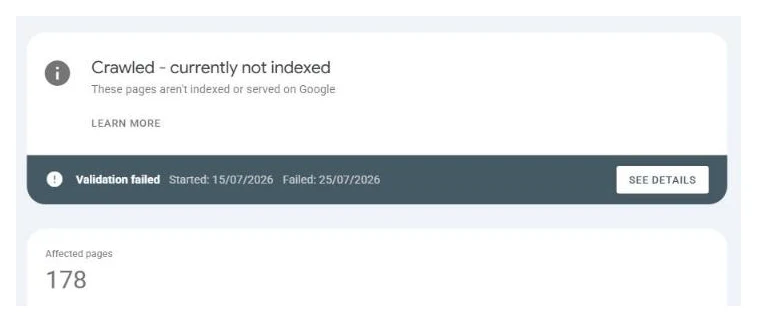
The Validate Fix button gets the same honesty. Most articles tell you to hit it, so people hit it and wait. Validation asks Google to re-check the affected pages, and if the pages have not changed, the re-check returns the same verdict. Validation confirms a fix you already made. It is not a fix. If you want the states themselves explained, validation started in Search Console covers what each one means and how long the queue takes.
Rewriting URLs that were never meant to be indexed does not fix it either, because nothing is wrong with them. That is the whole point of the triage step above: the feed rows and the search rows are the report working correctly, and editing them changes a number without changing anything that matters.
Indexing bots and automated submission tools do not fix it either. They violate Google’s guidelines, most of them stopped working after the Indexing API crackdowns, and the ones that limp on put your site at risk for a status that was never about submission in the first place.
What actually fixes it?
You change Google’s answer to the only question it is asking: is this page worth storing?
- Fix the cause you identified in step 3, not all four. A page declined for thin content does not get better because you added internal links to it, and a well-written orphan does not get better because you rewrote it again.
- Kill the near-duplicates rather than improving both. Two pages competing for one query usually means Google stores neither. Merge them, or set a canonical so Google knows which one to keep.
- Link the page from somewhere that already ranks. Not from a footer block, from inside the body of a page Google already values.
- Fix the site-wide pattern, not just this URL. If a hundred pages share the template that got declined, you are fixing a hundred pages, and fixing one of them proves nothing.
- Request indexing once, after the change is live. Once. Validate Fix without a change fails on schedule.
- Re-inspect after a week. A status that moved to indexed proves the cause; a status that did not means the cause is still there, or you fixed the wrong one of the four.
That last step is the one that turns this from guesswork into a method. You are running an experiment with one variable, and the status is the result.
How long it takes after you fix it
There is no schedule, and anyone who gives you one is guessing. What the tracked jobs show is a wide spread: some pages flip the same day the cause is fixed, some take weeks while Google makes up its mind, and pages on newer domains sit at the slow end of that range regardless of how good they are. The full timelines from tracked URLs are here, measured rather than estimated.
The practical consequence is to change one thing, wait a week, and read the status before changing anything else. Sites that get fixed fastest are the ones where somebody was patient enough to find out what worked. It is why every job I run ends with a per-URL ledger instead of a promise: every page marked indexed, pending, or fixed, with dates, so you can watch the decision change.
How many of these pages are normal?
Some residue is always normal, and a count on its own tells you nothing. What matters is the composition. A thousand rows that are all feed URLs and filter parameters is a healthy site with a noisy report. Forty rows that are all your product pages is a serious problem wearing a smaller number.
So do not chase the total to zero. Chase the second pile from step 2 to zero, and let the first pile sit there.
Where this fits in my work
Diagnosing which of these patterns applies is the first step of every indexing job I take. If the cause turns out to be thin content, the fix crosses into content work, and I will say so instead of resubmitting pages that will keep getting declined. The results of that approach are public: case studies tracked URL by URL, including catalogues that went from mostly ignored to mostly indexed.
Before you start fixing, make sure this is the status you actually have: the Last crawl check above takes a minute, and editing a page that Google has never fetched changes nothing. This status is one of about a dozen Search Console can show you, and they do not all mean trouble. The full status map is here.
If your Search Console is full of Crawled, currently not indexed, send me the site. As a Google Search Console expert, I will tell you which pattern is doing it, free, usually within a day. No obligation.
If the pages in question were generated in bulk, read is programmatic SEO bad next. It covers what John Mueller said in September 2026 about a site-level loss of confidence, and why removing the thin pages does not reset it.
Quick answers
What are the main causes of crawled, currently not indexed?
Four patterns cover almost every case in my client ledgers: thin content that does not say enough to be worth storing, near-duplicate pages competing with each other, weak internal linking that leaves the page unvouched for, and a site whose overall standing makes Google index selectively. Most stuck pages combine two of these.
What is the difference between crawled and discovered, currently not indexed?
Crawled means Google fetched the page and declined to store it, so the page itself is the problem. Discovered means Google knows the URL exists but has not fetched it yet, which points at crawl priority and internal links instead. The fixes are different, which is why the two statuses should never be treated as one.
Is crawled, currently not indexed a penalty?
No. It is a quality decision about individual pages, not a sanction against the site. Google fetched the page, judged it not worth storing, and moved on. Change what made it decline and the decision gets re-made.
Does Validate Fix solve crawled, currently not indexed?
No. Validate Fix only asks Google to look again; it changes nothing about the page. If the content that was declined is still the same, validation ends the same way. In practice fixing first means changing what made Google decline: rewrite the thin or templated content, strengthen the internal links pointing at the page, then request indexing once. Validation after a real change passes; validation after no change fails on schedule.
How many crawled, currently not indexed pages are normal?
On a large catalogue, some residue is normal, because Google rarely stores every variant and filter page. It becomes a problem when pages you need to rank sit in the status for weeks. Those are the ones worth fixing and resubmitting.
Where do I find the list of affected URLs in Search Console?
Indexing, then Pages, then scroll to the table headed Why pages are not indexed and click the row named Crawled - currently not indexed. That opens the drilldown with the affected URLs and an export button. The export caps at 1,000 rows, which matters on a large catalogue because the sample you get back is not the whole problem.
Can a page be crawled, currently not indexed and still rank?
No. The status means the page is not stored in the index, so it is not eligible to appear in results for anything. If you are seeing the page in Google while Search Console reports this status, you are almost certainly looking at a different URL: a trailing-slash variant, an http version, or a parameter version of the same page.