URL is unknown to Google means Google has no processed record of your URL. It is a status, not a fault. It has five real causes, from the wrong property being open to a page Google crawled once and has since forgotten.
Your page loads fine in a browser. You can send the link to a friend and they can read it. Search Console says Google has never seen it. That combination is unsettling the first time you meet it, and the advice you will find is mostly one paragraph long and only describes half of what this status means.
Because it means two very different things. One of them is a new page waiting to be found. The other is an old page Google has quietly let go of. They look identical in the report, and the fixes point in opposite directions, so working out which one you have is the entire job.
Never known, or known and let go
Google holds no processed record of the URL, and the fix depends on whether it never knew the page or knew it once and let go. For a new page it usually means Google has not discovered it yet, and links plus a sitemap plus one indexing request fix it within a week or two. For an older page it can mean Google crawled it long ago and has since let the record go, and no amount of resubmitting fixes that; the page needs internal links and content that create crawl demand again. The Performance report separates the two cases: if the URL ever recorded impressions, Google knew it and forgot it, and you are fixing demand, not discovery.
What “URL is unknown to Google” actually means
Google’s URL Inspection documentation gives the simple version: “this means that Google hasn’t seen this URL before.”
Google’s own Search Central community guidance then complicates it, and this is the sentence almost nobody quotes. It says the status “doesn’t necessarily mean Google is completely unaware of the URL”. What it reliably tells you is that the URL is not in Google’s processed records right now. How it got to that state is a separate question, and the tool will not tell you.
So read the status as “Google has no current record of this URL”, not as “Google has never encountered this URL”. The second reading sends people off fixing the wrong thing.
The two things this status can mean
| What to compare | Google never saw it | Google saw it and let go |
|---|---|---|
| Typical page | New page, new site, orphan page | Older page that once had traffic |
| Signature | No impressions ever recorded | Historical impressions or clicks |
| What fixes it | Discovery: links, sitemap, one submission | Crawl demand: quality, internal links |
| Does requesting indexing help | Often yes | Almost never |
Adam Gent at Indexing Insight argues Google’s single definition should be split in two for exactly this reason, calling the current wording “misleading and it needs to change”, on the basis of their own monitoring data showing that “Google has seen pages labelled ‘URL is unknown to Google’.” That is a well argued vendor position rather than settled fact, and Google has not changed the documentation. I mention it because the underlying observation matches what I see on client sites constantly.
Gary Illyes, in comments reported by Stan Ventures from a LinkedIn discussion, described such URLs as having “no priority whatsoever” for crawling, because they are not known to Google Search in the first place. Treat that as reported rather than as a first party statement, since the original thread is not something I can link you to directly.
How to tell which one you have
This is the test the other guides skip. Work down it in order and stop at the first yes.
Cause 1: “URL is not in property”, or the wrong property is open
If Search Console told you “URL is not in property”, this section is your whole answer and it is a thirty-second fix: the URL you pasted does not belong to the property you currently have open. Pick the right property from the dropdown at the top left and inspect again. Nothing is wrong with your page. For the message on its own, with the property types side by side, see URL is not in property in Search Console.
Rule this out first even if you saw the unknown status instead, because it costs thirty seconds and it is the most common cause among people meeting this status for the first time. Google’s documentation states the constraint plainly: “the URL must be in the current property.” It never connects that line to this status, which is why no one thinks of it.
Things that make a URL a different URL as far as Search Console is concerned:
- A URL prefix property covers only URLs under that exact prefix. A domain property covers the whole domain including subdomains. Inspecting a blog subdomain URL against a root URL prefix property will not go well.
http://andhttps://are different properties.www.and nonwww.are different properties.- A trailing slash, a capital letter, or a tracking parameter makes it a different URL.
- If the URL redirects, the URL you typed is not the URL Google holds a record for. Inspect the destination.
If any of these applies, nothing is wrong with your page and nothing is wrong with Google. You asked the wrong filing cabinet.
Cause 2: Google genuinely has not discovered it
This is the honest, boring case, and for a new page it is the likely one. Google finds URLs by following links and by reading sitemaps. If nothing links to your page and it is not in a sitemap Google has fetched, there is no path to it.
Check, in this order:
- Is the page linked from a page that is itself indexed? Discovery is a links problem first.
- Is it in your XML sitemap, and has Google actually fetched that sitemap recently?
- Is the link a real
<a href>rather than something only built by JavaScript on click? - Is the page an orphan, reachable only if you already know the URL?
Fix the links, make sure the sitemap includes it with an accurate lastmod, and request indexing once. Not repeatedly. Once. Accurate is doing real work in that sentence, because Google only uses lastmod when it is consistently verifiable, and a build timestamp on every URL is worse than no value at all.
Worth noting that Google’s community guidance warns against fixating on sitemaps as the answer. A sitemap helps Google find a URL. It does not create any reason to crawl it.
Cause 3: discovered, but not crawled yet
Google knows the URL exists and has not got to it. This is close to discovered, currently not indexed, and Google’s community guidance draws the line between them: discovered means Google tried and ran into crawl resource limits, while unknown means processing has not begun.
The fix here is not discovery, because discovery already happened. It is crawl demand, which is a polite way of saying Google has not been given a reason to prioritize your page. Internal links from pages that get crawled often, a site that responds quickly, and content that justifies the fetch all feed into it.
One correction while we are here. Google’s own community guidance lists “crawl budget issues only affect large websites” as a common misconception, and says sites of all sizes can be affected. The standard SEO line on this is wrong.
Cause 4: Google crawled it before and has forgotten it
This is the case that matters commercially, and the one you should suspect the moment a URL with history reports as unknown.
Index coverage states are not permanent verdicts. A page can move backwards through them: submitted and indexed, then crawled but not indexed, then discovered but not indexed, then unknown. Indexing Insight describe exactly this, noting that “index coverage states can be reversed and change over time”.
Their 190-day study is the only hard data I am aware of on the timing. The headline finding is that “after 190 days since last crawl, Google ‘forgets’ a Not Indexed page even exists”, with a reported 90% chance a page has begun to be forgotten past that point. The methodology is worth stating so you can weigh it yourself: 1.4 million pages across 18 sites of varying size and authority, submitted by XML sitemap and monitored daily, with days since last crawl derived from the URL Inspection API. It is a single vendor study rather than peer reviewed work, and it is one vendor’s population of sites. I treat it as a strong signal and not as a law.
What matters practically is the direction of travel. If a URL has not been crawled in months, it is drifting toward this status, and requesting indexing will not arrest that. The cause is that nothing about the page is generating crawl demand. That is a quality and internal linking problem, and it is the same underlying issue behind pages dropping out of the index.
Cause 5: the report is simply stale
The first screen you see in URL Inspection is a lookup against Google’s stored data. Google says so: “this initial page is not a live test of the URL.” The live test is the separate button, and it does something different.
That gives you four combinations, and they are worth reading properly:
| Index result | Live test passes | Live test fails |
|---|---|---|
| Unknown | Page is fine, Google has no record yet. Normal for new pages. | Fix the fetch problem first. Nothing else matters until Google can retrieve it. |
| Indexed | Healthy. | Something broke recently. Investigate before the index record goes stale. |
A freshly published page sitting at unknown with a passing live test is not broken. It is new.
Why it still says unknown after you requested indexing
This is the question in almost every forum thread on the topic. People have already submitted the sitemap and already pressed the button, and it did not work.
Google’s documentation sets the expectation: “indexing can take up to a week or two”, and “submitting a request does not guarantee that the page will appear”. The button puts the URL in a priority crawl queue. It does not put it in the index, and it does not change what Google thinks of the page when it arrives. There is more on what that button really does in does Request Indexing actually work.
A rough reading of the clock:
| Time since you submitted | What it probably means |
|---|---|
| Under 2 weeks | Normal. Leave it alone. |
| 2 to 6 weeks | Discovery is not the issue. Look at cause 2 or 3. |
| Beyond that | Suspect cause 4. Waiting is the wrong response. |
Pressing the button again does not help. There is a daily limit on submissions, and a second identical request carries no new information.
How to check this across a whole site
One URL at a time is fine for one URL. It falls apart the moment you have a catalogue, and by then the interesting question is not “is this page unknown” but “how much of my site is”.
The URL Inspection API returns the same verdict in bulk, up to 2,000 URLs per property per day. That is what the free bulk URL inspection tool here runs: point it at a sitemap, let it work through the list, and you get a distribution rather than an anecdote.
What to do with the output:
- A handful of unknowns among new URLs is normal.
- A cluster of unknowns in one section usually means an internal linking gap, not a content problem.
- Unknowns spread across old, previously performing URLs is cause 4, and it is the pattern that should worry you.
- Unknowns across the whole sitemap usually means the sitemap is not being read, or you are looking at the wrong property.
Advice about this status that is wrong
| Common claim | Why it is wrong |
|---|---|
| It means Google has literally never seen this URL | Google’s own community guidance says it “doesn’t necessarily mean Google is completely unaware of the URL” |
| The blank Discovery field proves Google never found it | That field is always blank for unknown URLs, because discovery data is only reported after processing. It is expected, not diagnostic |
| Just keep requesting indexing | There is a daily limit, and Google states submission does not guarantee indexing. Repeats do not raise priority |
| Submitting a sitemap will fix it | Sitemaps aid discovery. They do not create crawl demand |
| If it shows unknown it cannot be blocked by robots.txt | False. Check robots.txt regardless |
| Social shares and engagement get pages indexed | Google has said repeatedly that social signals are not an indexing factor |
| Crawl budget only matters for large sites | Google’s community guidance names this specifically as a misconception |
| Unknown and discovered, currently not indexed are the same | They are separate states with separate causes and separate fixes |
| If the live test passes, the page is fine | The live test shows a page could be fetched. It does not index it |
If Search Console showed you a different message
The statuses in this family read alike and mean different things, so it is worth being sure you are on the right page:
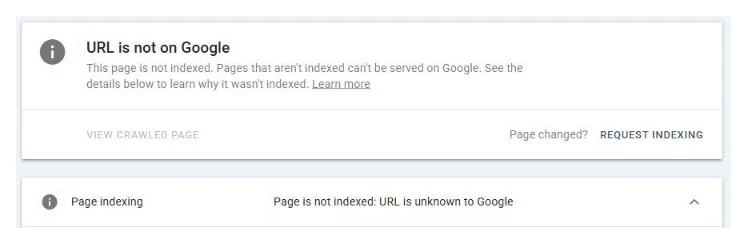
- “URL is not on Google” is a verdict rather than a reason, and the actual cause is in the section underneath it.
- “URL is not available to Google” comes from the live test, not the index, which is why an already indexed page can show it.
- “URL is not in property” means the wrong property is open in the dropdown. That is Cause 1 above, and a thirty-second fix.
The full set is on one page: every Search Console indexing status, explained, with what each one means and whether it is worth your time.
The checks, in order
- Confirm you are in the right property, and that the URL you pasted matches the protocol and host the property covers.
- Check whether the URL has historical impressions in the Performance report. If it does, Google knew it once, and this is a forgetting problem rather than a discovery problem.
- If it is genuinely new, give it up to two weeks with a sitemap entry and at least one internal link pointing at it.
- If it is older than that and linked, stop waiting. The page has no crawl demand behind it, so build internal links from pages Google already crawls.
- Request indexing once. Repeats do nothing and there is a daily limit.
- Re-inspect after a week and compare the Discovery field, not just the verdict.
If a lot of your catalogue is sitting at unknown, that is not a page level problem any more, and it is the point where the indexing work starts. Send me a URL list and I will tell you which of the five causes you actually have, free, before anyone mentions money.
Quick answers
Is URL is unknown to Google an error?
No. It is a status, not a fault, and nothing on your page has failed a check. It means Google has no processed record of the URL, which happens for brand new pages, for pages nothing links to, and for pages Google crawled a long time ago and has since let go. The page itself can be perfectly healthy and still report this.
How long should I wait before treating this as a problem?
For a genuinely new page, up to a week or two is normal, and Google's own documentation uses that ceiling. Past two weeks on a page that is linked and in a sitemap, discovery is not the problem and waiting longer will not fix it. Past a month or two, stop waiting and start looking at why the page has no crawl demand behind it.
I submitted my sitemap and requested indexing. Why is it still unknown?
Because both of those actions help discovery, and discovery is only one of the five causes. If Google already knew about the URL and dropped it, resubmitting tells it nothing new. Repeat submissions do not raise priority either, and there is a daily limit on them. Work out which cause you have before spending another submission on it.
Can a page that used to rank show as unknown to Google?
Yes, and this is the case most guides miss entirely. Index coverage states can move backwards over time, and a page that stops being crawled can eventually drop out of Google's records altogether. If the URL has historical impressions or clicks in the Performance report, you are in this situation rather than in a discovery problem, and the fix is completely different.
What is the difference between this and Discovered, currently not indexed?
Discovered means Google knows the URL exists and has queued it but has not crawled it yet. Unknown means Google has no processed record of it at all. Google's own community guidance separates the two, describing the unknown case as one where processing has not begun. They look similar in a report and they need different fixes.
Does requesting indexing repeatedly help?
No. Google documents a daily submission limit and states that submitting a request does not guarantee the page will appear in the index. The button moves a URL into a priority crawl queue. It does not change Google's opinion of the page, so pressing it a second and third time on the same unchanged URL achieves nothing.