“URL is not available to Google” comes from the live test, not from the index. It means Google tried to fetch your page right now and could not. An indexed page can show it, which usually means you just broke something.
It looks like it belongs to the same family as the other Search Console messages about indexing. It does not, and that is the most useful thing to know about it.
The cause sits in the Availability section
The cause is never in the headline. It is in the Availability section underneath, and that section only exists on a live test. It is a fetch problem rather than a quality or indexing judgment, which means it is usually mechanical and usually fixable today.
Why “URL is not available to Google” is different
Google’s own documentation puts this message alongside the Availability section, and labels that section “Availability (live test)”. That single word tells you which clock you are reading.
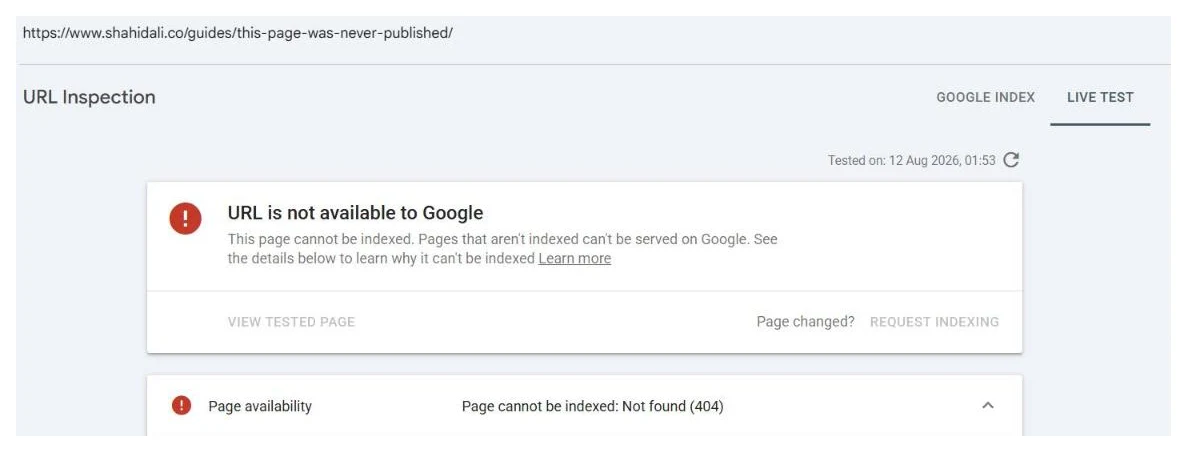
The other messages describe Google’s stored record: what it knows, when it last crawled, what it decided. This one describes right now. So two things follow that catch people out:
An indexed page can show this. Google indexed it last week, something broke since, and the live test is telling you before your traffic does. That is a good outcome caught early, not a contradiction.
A page that passes the live test can still be unindexed. Fetchable and worth keeping are separate judgments. Google says as much: a positive live result is no guarantee the page will appear, because the test does not check quality guidelines, manual actions or security issues.
The causes, in the order worth checking
Blocked by robots.txt. Cheapest to rule out and the most common. Open your robots.txt in a browser and read it rather than assuming. Disallow rules that were correct on staging have a habit of shipping to production.
404, or a soft 404. The URL does not exist any more, or it returns a page that says nothing is there while sending a 200 status. If you changed a slug and did not redirect, this is your answer. Whether that 404 needs fixing at all is a separate question, and Not found (404) in Search Console works through when to redirect and when to leave it.
Redirect error. A chain that loops, exceeds the hop limit, or lands somewhere broken. Follow it by hand and see where it actually ends.
401 or 403. The page is behind authentication or the server is refusing the request. Common on staging that was never opened up, and on production sites where a security plugin or WAF has decided Googlebot looks suspicious.
Server error, 5xx. Your server failed at that moment. Sometimes transient, sometimes a real capacity problem that also affects real visitors. Check whether the timestamp lines up with anything in your logs.
DNS or connection failure. Google could not reach the host at all.
N/A. Google’s documentation admits this is a generic failure with no further information available. Do not over-read it. Retry, and check your own logs for that timestamp.
When it is your site, not your page
If you see “Not available due to a site-wide issue”, stop looking at the individual URL. Google is telling you it could not run a live inspection against the property at all.
That points at DNS, at a server that is not responding, or at robots.txt itself returning a server error, which Google treats far more severely than a missing file. A robots.txt that 500s can stop crawling across the whole site, and it is the kind of failure that produces a lot of panic about individual pages when one fix resolves everything. I wrote up the documented timings behind it in failed: robots.txt unreachable.
The trap: it works in your browser
The most common frustration with this message is that the page loads perfectly for you. It usually will, because Googlebot is not you. It arrives from a different network and a different country, with no cookies, no session, and a user agent some security products treat as hostile.
Things that produce exactly this pattern:
- A firewall, WAF or bot-protection rule challenging non-human traffic
- Rate limiting that trips when a crawler requests several URLs quickly
- Geo-blocking that excludes the region Googlebot is fetching from
- A CDN serving a challenge or interstitial rather than the page
- A login wall or paywall applied more broadly than intended
- Content that only appears after JavaScript your server did not render
Testing in a private window with JavaScript disabled gets you closer to Googlebot’s experience than a normal browser tab will. Your server or CDN logs are better still, because they show what was actually served to that request. That is the step people skip, and it is usually the one that answers it.
What to do, in order
- Read the reason Google gave. “Site-wide issue” means stop debugging this URL and go look at DNS, the server, and whether robots.txt itself returns an error.
- Check robots.txt for a rule that catches the path. It is the cheapest thing on this list to rule out, which is why it sits this high. Disallow rules written for staging ship to production more often than anyone admits.
- Check the status code the URL actually returns, with curl or a header checker, rather than trusting what the browser puts on screen. A 404, a redirect chain, or a 5xx shows up here in a form you can act on, and a soft 404 will return 200 while reading as missing, which is its own status with its own fix order.
- Fetch the URL in a private window with JavaScript disabled. If that fails too, it is not a Googlebot-specific problem.
- Check your firewall, bot filter, CDN and rate limiting for anything that challenges a non-browser client or a foreign IP.
- Check for geo-blocking and login walls. Googlebot arrives without your cookies, your session, and often from another country.
- If the reason shows N/A, retry later and check server logs at that timestamp. Google says outright it has no further information about N/A, so a single one is noise.
- Once it fetches cleanly, re-run the live test, then inspect the indexed status separately. Passing the fetch is not the same as being indexed. Here is what the request indexing button actually does.
Once it fetches, you may have a second problem
Fixing availability gets Google in the door. It does not commit Google to keeping the page.
That second problem has its own status, and so does every other thing Search Console can tell you. The whole set is mapped here.
If the URL becomes fetchable and then settles at crawled, currently not indexed, that is a different problem with a different cause, and the fix has nothing to do with servers. If it shows as unknown to Google instead, you have a discovery problem. And if the top line reads “URL is not on Google”, the real reason is in the section underneath it.
No submission tool helps with any of this, incidentally. A URL that cannot be fetched cannot be indexed by anything, whatever it costs. The full market comparison is here.
If the live test keeps failing and your logs are not telling you why, send me the URL. The diagnosis is free and you get the cause named rather than a list of things to try. Where there is real work, indexing work starts at $25 with a per-URL ledger. If it is affecting a set of pages rather than one, check the whole list at once, and this is what that looks like across location pages.
Quick answers
Is "URL is not available to Google" the same as not being indexed?
No, and confusing the two sends people down the wrong path. This message comes from the live test, which fetches your page right now. Not being indexed is a statement about Google's stored record. A page can be indexed and still fail the live test, which usually means you have broken something since Google last crawled it, and you have caught it early.
My page is live in a browser, so why does the live test fail?
Because Googlebot is not you. It arrives from a different network, without your cookies or session, and often from a different country. Anything that treats it differently will produce this: a robots.txt rule, a firewall or bot filter, geo-blocking, rate limiting, a login wall, or a CDN rule that serves it a challenge page. Test the URL in a private window with JavaScript disabled to get closer to what it sees.
What does "Not available due to a site-wide issue" mean?
It means the problem is not with the URL you inspected. Google could not run a live inspection against the site at all, so the usual suspects are DNS failures, an unreachable server, or robots.txt itself returning a server error rather than a page. Fix it at the site level and the individual URLs resolve themselves, so do not start debugging one page.
The reason shows as N/A. What now?
Google's documentation is unusually candid here: N/A is a generic failure that does not fall into a known category, and it says it has no further information about it. So there is nothing to decode. Retry the live test later, check your server and CDN logs for what happened at that timestamp, and treat a single N/A as noise rather than a diagnosis. A persistent one is a server-side investigation, not a Search Console one.