Yes, for the right page. A new or newly fixed URL usually gets crawled within hours of the request. It does nothing for a page Google already crawled and declined, so spend the daily limit on the first kind.
I have pressed that button thousands of times across 740+ client sites, tracking each URL afterward, so here is what it actually does, when it works, and when it is a waste of your daily limit.
Yes, for new and updated pages only
Yes, with a boundary. Request Indexing reliably speeds up the pickup of new and genuinely updated pages on healthy sites; I routinely see them fetched within hours of a manual submission. It does nothing for pages Google has already crawled and declined, because the button re-queues a fetch without changing Google’s opinion of the page. It cannot override a noindex tag or a robots block, and it does not move rankings. Treat it as a priority pass for a small daily allowance, in my experience around a dozen URLs, spent on pages that are either new or actually fixed.
What does the button actually do?
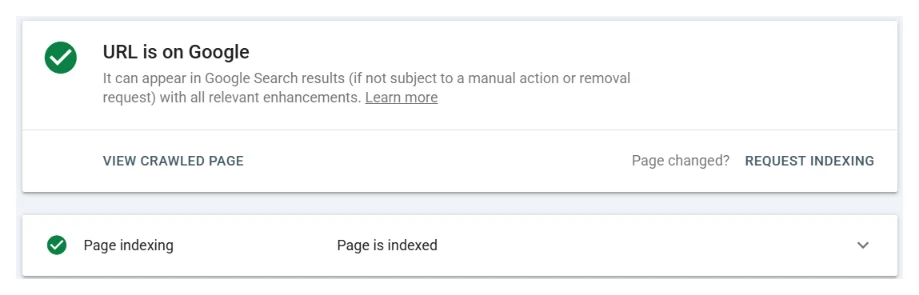
When you inspect a URL and click Request Indexing, Google runs a quick live test on the page and, if the page is reachable, drops the URL into a priority crawl queue. That is the entire transaction. It is a signal that says “look at this one sooner”, not a command that says “index this”.
Google’s own documentation is plain about this: requesting a crawl does not guarantee inclusion. The button moves your page up the queue. What happens when Google arrives is decided by everything else.
When it works, and works fast
On an established site that already indexes well, Request Indexing on a genuinely new or genuinely updated page is quick and reliable. I routinely watch pages on healthy client sites get picked up within hours of a manual submission, sometimes faster. If your domain has history and the page is real, the button does exactly what you hope.
It is also the right tool after a fix. Remove a stray noindex tag, rewrite a thin page, repair a blocked section, and a manual submission tells Google the situation changed. This is the core of how I run indexing jobs: fix the cause first, then submit by hand, then track the URL until it flips.
When it does nothing
The button does nothing for a page Google has already seen and declined. If a URL sits in Crawled, currently not indexed and you resubmit it unchanged, Google crawls it again, reaches the same verdict, and the status does not move. I have watched owners do this daily for weeks. The page was never going to index, because the page was the problem, not the queue.
I have the numbers from my own work too. On the 118-day store, the ledger lists 50 submitted pages that I tagged “Google crawled it and declined”. 38 of them had been submitted at least twice since December 2025, some four times, and all 50 were still not indexed on 26 July 2026. On the same date, of 191 pages not indexed across the whole site, I had marked just 3 as the kind a submission would fix.
It also cannot override an instruction. A page with a noindex tag or a robots block can be submitted all day; Google will obey the block every time. And it does not touch rankings: an indexed page that ranks on page five needs on-page work, not resubmission.
The daily limit, and what it forces you to do
Search Console caps manual submissions, though Google has never published the number: the help page says only that a daily limit exists. What I observe, running this every working day, is roughly a dozen per property before the tool stops accepting them. I have set out what Google does and does not publish about the daily limit separately. People treat the cap as an annoyance. It is actually the strategy: it forces you to decide which pages matter.
On large jobs I work inside that limit every day. One store’s backlog took over a thousand manual submissions spread across 118 days, priority pages first, the rest flowing through the sitemap as the site’s standing improved. The daily log for that store from 19 December 2025 to 15 February 2026 shows the shape of it: 431 submissions spread over 43 days, usually 10 or 11 a day, plus six more days where the only entry is my note “crawl budget exhausted”. That is the honest workflow for a big site: the button for the pages that earn revenue, sitemaps and internal links for the rest, and a per-URL ledger so nothing gets submitted twice or forgotten. Realistic speeds for all of this are in how long indexing takes.
How to spend the daily limit, in four steps
- Inspect before you request. Run the list through the free bulk checker so you know which pages are unknown to Google, which are crawled and declined, and which are already in.
- Request only for the first group: brand-new URLs, and pages you have just fixed. That is where the button reliably does something.
- Skip the crawled-and-declined group entirely. Requesting again asks the same question, and the answer has a cause that another request will not change.
- Let the sitemap carry the rest. How long that takes depends on the site, and each status on the way tells you whether to wait or act.
What about tools that press the button for you?
Indexing bots and bulk submission tools hammer the same machinery through the API. They violate Google’s guidelines, Google tightened the API specifically because of them, and most stopped working. The ones still sold shift the risk onto your site. Nothing they do beats fixing the reason a page was declined, which no tool automates.
The bottom line
Request Indexing works when the page deserves indexing and Google just has not gotten to it. It does nothing when the page has already been judged and found wanting. Which of those describes your site is exactly what I check first, free, usually within a day. Send me the website and I will tell you whether you need the button or a fix. No obligation.
Quick answers
How many URLs can I request per day in Search Console?
Google does not publish the number, but in practice the URL Inspection tool allows roughly a dozen manual submissions a day per property before it cuts you off. That cap is why priority order matters more than volume. On a large backlog I spend the day's dozen on the money pages first: the URLs that earn revenue or rankings, not the oldest ones. One store's 1,006-URL backlog took 118 days of exactly that rationing. The cap resets daily; the skill is choosing what deserves today's slots.
Does Request Indexing help pages that were declined?
Not by itself. The button re-queues a fetch; it does not change Google's opinion of the page. For a page sitting in crawled, currently not indexed, resubmitting the same content repeats the same decision.