Pages that exist but do not show on Google are almost always one of four things: never discovered, blocked by noindex or robots, crawled and declined, or sending weak signals, meaning thin content and few internal links. Search Console tells you which within seconds.
You built the pages. You paid for the site. And when you search for your own business, Google acts as if half of it does not exist. This is the most common problem clients bring me, and it almost always comes down to one of four causes. This guide walks through all four, how to tell which one is yours, and what actually fixes each.
Four causes, two kinds of problem
Search Console’s URL Inspection tool names which of the four causes you have, and the four split into two very different kinds of problem. A block or a missing link is mechanical: you change something on the site, and Google’s answer changes with it. A page Google fetched and declined is a judgment, and no amount of resubmitting overturns a judgment. Across 740+ client sites those four cover nearly every case I have diagnosed, and the sections below take each in turn, with the exact wording Google uses for it.
First, confirm what you are dealing with
Two quick checks before anything else.
Search Google for site:yourdomain.com. That gives you a rough sense of what Google holds for your site, and rough is the operative word: Google’s own documentation says the operator does not necessarily return every indexed URL. Finding a page there is good evidence it is indexed. Not finding it proves nothing on its own, which is why the site: operator is not the check people think it is. Treat a gap as a prompt to look properly, not as a verdict.
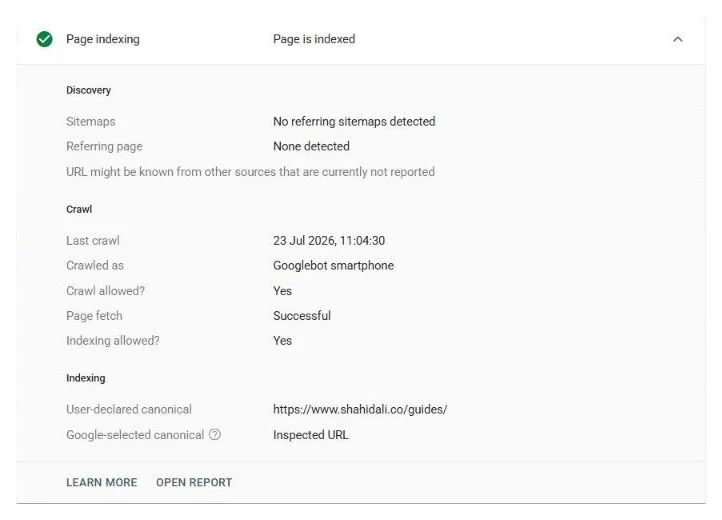
The proper look is Search Console. Paste a missing page into the URL Inspection bar at the top and Google will tell you exactly what it thinks of that URL. The wording it uses matters, and the causes below map to what you will see there. If it comes back as URL is unknown to Google, that status has two very different meanings and it is worth knowing which one you have before you act.
If the page IS indexed, you have a different problem
One distinction before the causes, because it changes everything. If the site: search finds your page, or URL Inspection says it is indexed, then Google has the page and is simply ranking it too low for you to see. That is a ranking problem, not an indexing problem: a competition for position, decided by content, relevance, and links. Fixing it is on-page SEO work, and no amount of indexing effort will move it. If the page sits on page two collecting impressions but no clicks, the title is where I start. This guide covers the other case: pages Google does not hold at all.
Cause 1: Google has not crawled the page yet
Google finds pages by following links and by reading sitemaps. A new page on a new site, with no links pointing at it and no sitemap submitted, can sit undiscovered for weeks. Nothing is wrong with the page. Google just has not met it yet. When Search Console labels a page Discovered, currently not indexed, this is the stage it is stuck at, and that status has its own guide.
The fix: submit a clean sitemap in Search Console, link to the page from pages Google already knows about, and request indexing for the URLs that matter most. On new sites this is often the entire problem, and it is the most satisfying one to fix.
Cause 2: something is blocking Google
Three blockers cover most cases: a robots.txt rule that tells Google to stay out, a noindex tag that tells Google not to store the page, and login walls that stop Google from seeing the content at all.
The leftover noindex tag deserves special mention because I find it more often than you would expect. A developer switches indexing off while building the site, launches, and forgets to switch it back on. The site looks perfect. Google is politely obeying an instruction nobody remembers giving.
Two platform switches deserve naming too, because I keep finding them. WordPress has a single checkbox, “Discourage search engines from indexing this site”, that survives launch far more often than anyone admits. And a Shopify store behind its password page is invisible to Google entirely, no matter what else is configured right.
The fix: remove the block, then resubmit the affected URLs. Finding every block is exactly what a Search Console diagnosis is for, because some of them hide in places owners never look.
Cause 3: Google crawled the page and chose not to index it
In Search Console this shows up as Crawled, currently not indexed. Google fetched your page, read it, and decided not to keep it for now. It is the most frustrating status on the list because nothing is technically broken.
It usually means the page did not clear Google’s bar: the content is thin, the page is a near duplicate of another one, or the site as a whole has not earned enough trust for Google to store everything on it. This status is common enough that I wrote a separate guide on it: Crawled, currently not indexed, explained.
Cause 4: the site gives weak signals
Google reads your internal links as a statement about your own site: pages you link to matter, pages you do not link to do not. A page with no internal links pointing at it, sitting three clicks from anywhere, is telling Google it is unimportant. Thin content makes the same statement in a different way.
The fix: link the page from your navigation or from related pages that already rank, and give it enough substance to be worth storing. This is also why fixing indexing sometimes turns into an on-page SEO job: the two problems feed each other.
The fix, in order
- Inspect one affected URL in Search Console and read the Page indexing section underneath the verdict, not just the verdict itself.
- If it names a noindex tag or a robots.txt block, remove the block. Nothing else on this list matters until you do.
- If it says the URL is unknown or discovered, you have a discovery and priority problem. Link the page from pages Google already crawls, then submit the sitemap.
- If it says crawled and not indexed, the page itself was declined. Change what made Google decline it before you resubmit anything.
- Request indexing once, on the pages that matter commercially. Once, not repeatedly.
- Wait a week, then re-inspect the same URL and compare. If nothing moved, you fixed the wrong cause.
What I do when I take a job like this
The process is the same every time. I open your Search Console and name the cause for every URL you care about, in plain English, before any work starts. Then I fix what blocks indexing and submit every URL by hand. No bots, no software that violates Google’s guidelines. And you get a live per-URL ledger showing every page as indexed, pending, or fixed, so you never have to take my word for anything.
That ledger is the reason clients come back. You can see how the packages work, or browse the case studies, every one of them tracked URL by URL.
Here is what a few of those ledgers showed at their last check, one row per site. The right-hand column is the pattern in the pages that were not indexed.
| Site | URLs tracked | Indexed | What stayed out |
|---|---|---|---|
| A UK locksmith | 192 | 135 | Town pages built from one layout (“lock change in [town]”, “emergency locksmith in [town]”) |
| A US cash home buyer | 161 | 38 | Long-tail “sell your house with…” landing pages, and 13 of 17 city pages |
| ohsmanuals.com, safety manuals and training | 418 | 346 | State compliance pages from one template, 16 of 25 |
| A tokenised commodities site | 243 | 1 | Everything except the homepage, including 223 articles |
| wekleenclutter.com, junk removal in four towns | 64 | 63 | Nothing that should be indexed; the one row left is a footer page |
Two things in that table match the causes above. The pages that stay out are usually the ones that repeat a template, which is what cause 3 looks like from the outside (my ledger records indexed or not, not the exact Search Console reason). And when a site has one page indexed out of 243, I stop reading URLs one by one and start with the site itself, which is cause 4.
The honest part
Nobody can guarantee indexing, because Google makes the final call. Anyone who promises it is selling you something. What can be guaranteed is the work: the cause found, the fix applied, every URL submitted properly, and a record that shows exactly where each one stands. Some pages index within days of the fix. Others take weeks. The ledger shows movement either way, and the realistic timelines, taken from tracked URLs rather than theory, are in how long Google takes to index a page.
If you would rather see the whole map before picking a cause, every Search Console indexing status is explained here, one row per status. And if this is more than a handful of URLs, the free bulk inspector gives you the status of every URL you paste, in your own browser, without sending the list anywhere.
Send me your website and I will tell you which of the four causes is yours, free, usually within a day. No obligation. Here is how hiring a Google Search Console expert works.
Quick answers
Is my site penalized if pages are not indexed?
Almost never. Real penalties are rare and come with a manual action notice in Search Console. Pages missing from the index are nearly always one of the four causes above: blocked, noindexed, undiscovered, or crawled and declined.
Do backlinks get pages indexed?
Links help Google discover pages and take a site more seriously, but they do not override an on-site block. A noindex tag or a robots rule wins against any number of backlinks, so fix the on-site causes first.
Does a brand-new site take longer to index?
Yes. A new domain has no crawl history, so Google fetches it cautiously at first. Clean structure, a submitted sitemap, and a few real pages indexed early build the trust that speeds up everything after.